⤴️-Paid Ad- Check advertising disclaimer here. Add your banner here.🔥
Leaderboard
Popular Content
Showing content with the highest reputation since 03/22/2026 in all areas
-
Coming soon... "KimSam Ai trading system on ninjatrader " https://ibb.co/0yv6s97K25 points
-
im sharing my own script please .. you need some basic Payton edit logic .. dont ask stupid questions .. ask gpt for help .. https://workupload.com/file/CJ7ZDjxyxt2 i will add more info soon ...22 points
-

Fixed ... QPilotPro_1_0_1_0
⭐ trader65 and 8 others reacted to Minigems for a topic
Cheers. https://workupload.com/file/rSnaTjnWqdk9 points -
https://workupload.com/file/HZAkFnjHLqw8 points
-

quantvue.io
Oana SSS and 5 others reacted to FalconFactory for a topic
Smooth Original Qzeus NQ 5min.xmlZeus 10Min CL.xmlZeus 5Min GC.xmlZeus 1Min NQ.xmlQZeus 1.2 - Default ATS.xmlQZeus - MNQ - Shinobi.xmlThese are the default templates they provide. Hope that helps.6 points -

House Of Live Trades
techfo and 4 others reacted to Ninja_On_The_Roof for a topic
Over time, your Ninjatrader becomes heavy and filled with junkies day in and day out after using it. I have found this tool to clean up the mess. I think it is very useful. Kinda make your Ninjatrader all fresh and clean again. It also comes with the "auto log-in" function. It is kinda annoying that I would have to punch in my password everytime I log in. Yes, I know. It is for security protection but hey, if you wanna skip this step. Then use it. https://limewire.com/d/datun#k83IR7948G5 points -
new update soon .. https://ibb.co/Q3rwSRVs5 points
-

AnchoredVP、AnchoredVWAP
techfo and 4 others reacted to CaptainJack for a topic
AnchoredVP、AnchoredVWAP AnchoredVP.zip AnchoredVWAP.zip 5 points
 -

Does anyone have the Anchored Volume Profile indicator?
techfo and 4 others reacted to fxtrader99 for a topic
Here you go. AdvancedVolumeProfile.zip5 points -
KISS strategy
fxzero.dark and 4 others reacted to Ninja_On_The_Roof for a topic
This got confusing. I think the original topic was about the Kiss strategy from the Timeless dude. Gotta admit, he came up with cool names for his stuff. Timeless and Trendbender... Kiss Orderflow is entirely different. These 2 are not related. This dude, named Joey, is the same dude that used to trade with his Analytic Polarity ATI stuff all over YouTube, if I recall correctly. I remember because I did try out the Polarity stuff for like...a day! I guess, as time goes by, he has moved on and "invented" new other strats, Timeless stuff. Why dont you just make your own bot, using just SuperTrend and have a target of 20 ticks and a stoploss of 40 ticks. Just add an additional criteria to the strategy. Only enter signal for long if price is above 50 or 200EMA and vice versa, only enter signal for short if price is below. You would hit your 20 ticks profit in no time. 🤗 Even when market is choppy. 20 ticks target is still quickly reached before SuperTrend decides to flip flop. It is fun to watch, especially when you delivered your own baby, your own bot.😷5 points -

KimSam Ai trading system on ninjatrader
bryandarktuni and 3 others reacted to kimsam for a topic
If u mean about cost .. its working on few cost .. 1 -3 $ max a month..4 points -
House Of Live Trades
techfo and 3 others reacted to Ninja_On_The_Roof for a topic
Off note, for more than a thousand dollar a piece, I know many of you were itchy to try out the infamous Ninza InfinityAlgo_Engine and, Captain Optimus Strong. Many of you have figured out the right way to make the Infinity works out perfectly. But here for those who truly want to try it. https://limewire.com/d/iA3oi#LKXmoStkwH Be aware that, you gotta give and take. Meaning, these pieces would kill many of your favorite Ninza indicators right off the bat. I didnt have time to go through each of them but I know, the Zephyrus, The OmniScan and the StormEye would work fine with these two, so far, at least. As always, I recommend that you would first go into your documents/bin/custom and copy all the Resource files for Ninza, ones you currently have running. Copy them, save them somewhere, so that if and when you want to switch back to the way you had before with all other Ninza indicators, then just copy them and paste them back into your custom folder. That way, you dont need to uninstall everything to start fresh. Save you a whole lot time. Who knows, maybe you would find these 2 useful to automate all of your other stuff and worthy of giving up a bunch of your other Ninza indicators. Off note once again, for the Infinity to work, you first need to pull up an indicator with signals that you wanna automate it. Then that would show up in the Infinity's setting.4 points -
House Of Live Trades
AllIn and 3 others reacted to Ninja_On_The_Roof for a topic
Not a bad day for me. I am done for the day. Good trading folks! Stay positive. Stay green guys!🥰4 points -

Metastock 20 realtime c*****d
babeonidi and 3 others reacted to ⭐ Atomo12345 for a topic
Please apply this notes: Hello, You may want to contact our support to see if we can assist. In a small number of cases we have seen where the program can hang with certain display settings. This has been seen only recently. While we are uncertain as to the source of the issue, it is possible that a recent Windows update has triggered this behavior. One thing you can try to see if this might help is: 1. Right-click on the MetaStock shortcut and click Properties 2. Click the "Compatibility" tab 3. Click the "Change High DPI Settings" button 4. Place a checkmark next to "Override high DPI scaling behavior." 5. Click on the drop-down box and change this to "System" 6. Click OK Try launching MetaStock and see if this helps. If not you may still want to contact our support https://www.metastock.com/company/contact.aspx to see what else can be done.4 points -

Trade Grade / Collapsible Panel Update
techfo and 3 others reacted to Chidiroglou for a topic
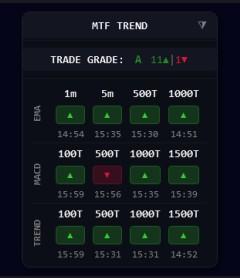
Added a grade for the number of Bull/Bear Badges, Added the ability to collapse the panel to only see the Grade & Title Sky_MTF--Grade-Minimize_Update.zip
4 points -
LUX ALGO
trader88 and 2 others reacted to Ninja_On_The_Roof for a topic
https://limewire.com/d/TfsDk#oC14QBFBzu3 points -
Yes .. many ai agents + ML3 points
-

AutoFibIndicator: Could someone please get this indicator working?
techfo and 2 others reacted to swiattrader for a topic
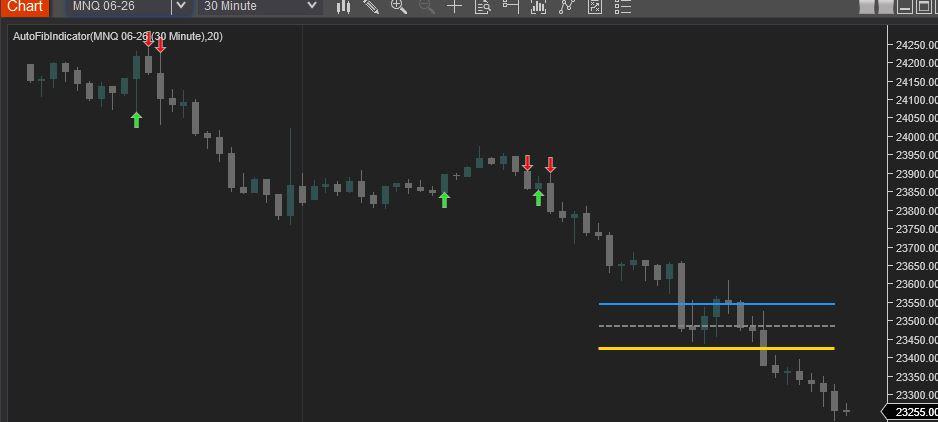
Find below the Revised AutoFibIndicator Script. Attached is a screen shot showing the compiled script (NT8 version: 8.1.6.3 64-bit). Enjoy! #region Using declarations using System; using System.Collections.Generic; using System.ComponentModel; using System.ComponentModel.DataAnnotations; using System.Linq; using System.Text; using System.Threading.Tasks; using System.Windows; using System.Windows.Input; using System.Windows.Media; using System.Xml.Serialization; using NinjaTrader.Cbi; using NinjaTrader.Gui; using NinjaTrader.Gui.Chart; using NinjaTrader.Data; using NinjaTrader.NinjaScript; using NinjaTrader.Core.FloatingPoint; using NinjaTrader.NinjaScript.DrawingTools; #endregion namespace NinjaTrader.NinjaScript.Indicators { public class AutoFibIndicator : Indicator { private MAX maxIndicator; private MIN minIndicator; [NinjaScriptProperty] [Range(1, int.MaxValue)] [Display(Name="Lookback", Order=1, GroupName="Parameters")] public int Lookback { get; set; } #region Color Properties [XmlIgnore] [Display(Name="Fib 38.2 Color", Order=2, GroupName="Colors")] public Brush Fib382Color { get; set; } [Browsable(false)] public string Fib382ColorSerializable { get { return Serialize.BrushToString(Fib382Color); } set { Fib382Color = Serialize.StringToBrush(value); } } [XmlIgnore] [Display(Name="Fib 50.0 Color", Order=3, GroupName="Colors")] public Brush Fib50Color { get; set; } [Browsable(false)] public string Fib50ColorSerializable { get { return Serialize.BrushToString(Fib50Color); } set { Fib50Color = Serialize.StringToBrush(value); } } [XmlIgnore] [Display(Name="Fib 61.8 Color", Order=4, GroupName="Colors")] public Brush Fib618Color { get; set; } [Browsable(false)] public string Fib618ColorSerializable { get { return Serialize.BrushToString(Fib618Color); } set { Fib618Color = Serialize.StringToBrush(value); } } [XmlIgnore] [Display(Name="Long Signal Color", Order=5, GroupName="Colors")] public Brush LongColor { get; set; } [Browsable(false)] public string LongColorSerializable { get { return Serialize.BrushToString(LongColor); } set { LongColor = Serialize.StringToBrush(value); } } [XmlIgnore] [Display(Name="Short Signal Color", Order=6, GroupName="Colors")] public Brush ShortColor { get; set; } [Browsable(false)] public string ShortColorSerializable { get { return Serialize.BrushToString(ShortColor); } set { ShortColor = Serialize.StringToBrush(value); } } #endregion protected override void OnStateChange() { if (State == State.SetDefaults) { Description = @"Automatically plots Fibonacci levels based on a lookback period."; Name = "AutoFibIndicator"; Calculate = Calculate.OnBarClose; IsOverlay = true; DisplayInDataBox = true; DrawOnPricePanel = true; IsSuspendedWhileInactive = true; Lookback = 20; Fib382Color = Brushes.DodgerBlue; Fib50Color = Brushes.Gray; Fib618Color = Brushes.Gold; LongColor = Brushes.Lime; ShortColor = Brushes.Red; } else if (State == State.DataLoaded) { maxIndicator = MAX(High, Lookback); minIndicator = MIN(Low, Lookback); } } protected override void OnBarUpdate() { if (CurrentBar < Lookback) return; double swingHigh = maxIndicator[0]; double swingLow = minIndicator[0]; double range = swingHigh - swingLow; if (range <= 0) return; double fib382 = swingHigh - (range * 0.382); double fib50 = swingHigh - (range * 0.5); double fib618 = swingHigh - (range * 0.618); // Using static tags for lines ensures they "move" with the lookback rather than creating new ones Draw.Line(this, "Fib382", false, Lookback, fib382, 0, fib382, Fib382Color, DashStyleHelper.Solid, 2); Draw.Line(this, "Fib50", false, Lookback, fib50, 0, fib50, Fib50Color, DashStyleHelper.Dash, 2); Draw.Line(this, "Fib618", false, Lookback, fib618, 0, fib618, Fib618Color, DashStyleHelper.Solid, 3); // Signal Logic // Long: Close crosses above 61.8% if (CrossAbove(Close, fib618, 1)) { Draw.ArrowUp(this, "Long" + CurrentBar, true, 0, Low[0] - (5 * TickSize), LongColor); } // Short: Close crosses below 61.8% if (CrossBelow(Close, fib618, 1)) { Draw.ArrowDown(this, "Short" + CurrentBar, true, 0, High[0] + (5 * TickSize), ShortColor); } } } }
3 points -
ok .. got it ... lets test it .. https://workupload.com/file/R5cN4Y8DAVY its as new indicator and py connector .. u can keep the old running ..3 points
-
Sky's MTF Panel
techfo and 2 others reacted to Chidiroglou for a topic
Sky_MTF-Panel.zip3 points -
Signal Logic Signal Condition Long Entry Leavitt Projection crosses above Leavitt Convolution AND Convolution Slope < 0 Long Exit Convolution Slope is declining (current < previous) Short Entry (optional) Leavitt Projection crosses below Leavitt Convolution AND Slope > 0 Short Exit Convolution Slope is rising The Leavitt crossover signal is selective — it requires a specific crossover + slope condition. To test immediately: Backtest first: Right-click chart → Strategy Analyzer → run on recent data to confirm signals exist Reduce LeavittLength to 10 for more frequent signals Configurable Parameters (NQ, ES) Parameter Default Purpose Leavitt Length 20 Main linear regression period Quantity 1 Contracts/shares per trade Profit Target Ticks 0 (off) Set > 0 to enable Stop Loss Ticks 0 (off) Set > 0 to enable Recommended Scalping Settings Setting ES/MES NQ/MNQ Timeframe 1 min 1 min Leavitt Length 14–20 10–16 Profit Target 8–16 ticks 20–40 ticks Stop Loss 12–20 ticks 30–50 ticks Allow Shorts Yes Yes Instrument: ES, NQ, MES, MNQ (or any liquid futures/stocks) Timeframe: 1-minute or 2-minute bars for scalping Profit Target: 8-16 ticks (ES) or adjust per instrument Stop Loss: 12-20 ticks Trail Stop: 8-12 ticks Best Tested For NQ- Sniperbar/Ninjarenko 20-40, Leavitt Length- 40 (Other Suggestions Most Welcome) Event What Gets Printed Strategy goes live Confirmation with instrument, account, all settings Every 10th bar Bar number, time, close, projection, convolution, slope, position Entry signal LONG/SHORT with all indicator values Exit signal Direction with slope values Order filled Price, quantity, time, unrealized PnL Order rejected Error code and native error message Order cancelled Order name and time Position change New position direction, quantity, average price Strategy terminated Shutdown confirmation Leaveitt Auto.zip3 points
-
Metastock 20 realtime c*****d
⭐ chullankallan and 2 others reacted to ⭐ Atomo12345 for a topic
In the crack of Metastock in DataFeed select ReutersDataLink. This fix the crash in system test and Explorer.3 points -
I use this one OrderLineDecoratorOrderFlowHUB-hjcdfp.zip3 points
-
drop this to the custom folder then compile and restart ninja, it worked for me with the resources eva provided https://workupload.com/file/2dnaBF2Z8E23 points
-
Haha limited edition 😄Every detail counts .. Name is just part of the user experience 😌2 points
-
Fixed ... QPilotPro_1_0_1_0
AllIn and one other reacted to Ninja_On_The_Roof for a topic
I think you could automate this one. I dont see any issues automating it with PredatorX or other known software. On a side note, I do actually like this QPilot Pro. It is light, easy on the eyes and most importantly, it produces good signals. I also like the panel, works great combined with posted Maverick Radar and Sky's MTF Panel. The only thing I did was to uncheck the Target and Volume Peak. They are just cluttering and clouding the chart. Since I have my own targets set in mind and with other indicators to guide me with the potential targets, I just dont need to have QPilot's targets and Volume Exhaustion. This, cleans up the chart a little bit. But this is just me. Nothing wrong keeping them if you feel like you actually need them there. Just my humble 5 cents worth.🤩2 points -
WiSE Indicator
fxtrader99 and one other reacted to Ninja_On_The_Roof for a topic
https://limewire.com/d/bMZ6q#bL7BAs7TCa2 points -
check thi ud https://workupload.com/archive/7DmRZN8usS2 points
-
Not stable yet .. got many updates ..2 points
-

Rancho Dinero Acme Suite
kkreig and one other reacted to ⭐ RichardGere for a topic
Jhon Snow allows installation on multiple PCs. But you may have to show pictures of the PCs should he request. I have his Optuma on 3 of my computers. Bought it in 2021 and later requested for an upgrade in 2025. The upgrade was for 3 computers as well.2 points -
AnchoredVP、AnchoredVWAP
juanfer and one other reacted to CaptainJack for a topic
VP requires tick data to draw correctly.2 points -
Leavitt Autotrader -
ttthjjh and one other reacted to Ninja_On_The_Roof for a topic
I think it is from the White House, that Press Secretary lady named Leavitt.🤪2 points -
https://ibb.co/Y7qG2vzP https://ibb.co/3mn8vj7k2 points
-
Thanks codentrade.com.zip2 points
-
Metastock 20 realtime c*****d
babeonidi and one other reacted to ⭐ Atomo12345 for a topic
Effectivly Windows Defender detect a malware. If you want to be sure download this: https://workupload.com/file/6QGanPYZ78p In Version there is 19.0. If you have Metastock 20 insert 20.0.2 points -
MAX PAIN addition if possible. For a candidate settlement price P: Call payoff at strike K: max(0,P−K)×OI_call[K]max(0,P−K)×OI_call[K]. Put payoff at strike K: max(0,K−P)×OI_put[K]max(0,K−P)×OI_put[K]. Total payout to all option holders at P: TotalPayout(P)=∑K[max(0,P−K) OI_call[K]+max(0,K−P) OI_put[K]]TotalPayout(P)=K∑[max(0,P−K)OI_call[K]+max(0,K−P)OI_put[K]] You want the P that minimizes the above function if the Truth Engine has per‑strike open interest and option type, For each candidate settlement price, compute total payoff to calls and puts using OI. Choose the price with minimum total payout. This is the Max Pain level. Max Pain is the strike where option writers (dealers) pay out the least at expiration, i.e., where total option holder P&L is minimized. def calc_max_pain(call_oi, put_oi): strikes = sorted(set(list(call_oi.keys()) + list(put_oi.keys()))) if not strikes: return 0.0 best_price = strikes[0] best_payout = float('inf') for p in strikes: payout = 0.0 # Calls: holders get paid when price finishes ABOVE strike for k, oi in call_oi.items(): if oi <= 0: continue intrinsic = max(0.0, p - k) payout += intrinsic * oi # Puts: holders get paid when price finishes BELOW strike for k, oi in put_oi.items(): if oi <= 0: continue intrinsic = max(0.0, k - p) payout += intrinsic * oi if payout < best_payout: best_payout = payout best_price = p return best_price2 points
-
@axsx check this update .. https://ibb.co/RT7YTSyn2 points
-

KimSam NT8 GEX Calc
bryandarktuni and one other reacted to axsx for a topic
You can also add the conversion ratio ( say QQQ to NDX is 1:42) and GEX Ratio: 0.48 ; Flow Ratio: 1.00; Strike filter (±3%); distance_from_flip; Gamma Intensity: MODERATE ==> --> 42.8% expiring in 7 days; Market Stability: STABLE; Pin Force: +0.0014 and Pin Confidence (if available). few of these may not fit into the model of realtime publication of your important metrics that is currently implemented, but this could act as a overall session summary metrics or a different timeframe summarization like 30min summarization. some ideas GEX_SUMMARY| spot=…;flip=…;peak=…;net=…; pos_wall=…;neg_wall=…; vol_zero=…;vol_pos=…;vol_neg=…; vix_regime=Risk-Off;vix_multiplier =1.35; hmm_regime=BULL;hmm_conf=0.8 Divergence flags: price crossing flip while net GEX sign unchanged, etc. VIX adjusted walls = Flip × VIXMultiplier, PosWall × VIXMultiplier, etc. GammaRegime = {LongGamma, ShortGamma} Distance from flip = (future price - schwab flip) / ATR volume weighting vs OI weighting. some of the ideas I am writing so that you can think about.2 points -
Great tool to get Gamma Flip level, Peak Gamma (strike with highest absolute GEX), Top 5 call/put walls, net GEX, the unique way you have addressed Fills missing Schwab gammas with a clean Black–Scholes fallback and logs live vs BS fill percentage . Please include if you can volume‑based GEX (flow‑oriented), major positive/negative GEX by volume, zero‑gamma by volume. Ability to filter out far end strikes, ability to export to csv file, png chart output, support for CBOE API (free), buttons appear in the middle of the chart and can be pushed to the top. dashboard toggle. The truth engine keeps on running every 3mins. a configurable parameter needed. Disconnect/Connect can be expanded to shut down the truth engine as I see it runs whenever the chart is loaded. One more thing is Top GEX markers P #5 | 3.16B, include the price level also like P#5 | 3.16B | 24250 for example.2 points
-

KISS strategy
fxtrader99 and one other reacted to JackSparrow440 for a topic
Here is the latest kiss Flowing 🤣 KISSOrderFlow_V_2.2.06.dll2 points -

FlowMatrix
fxtrader99 and one other reacted to kkreig for a topic
https://www.flowmatrix-nt8.com/ FlowMatriXFreePack.rar2 points -
Pack 205 NinZa Indicators
Eva Grey and one other reacted to ⭐ RichardGere for a topic
Tested this combination, the Captain Optimus Strong dll here + Eva's Resource file works. Thanks2 points -
NT8 GEX Calc
misalto and one other reacted to Ninja_On_The_Roof for a topic
Maybe it is time for you to binge on Netflix😜2 points -
Latest MTP PREDICTOR NT8 ADDON EDU
techfo and one other reacted to fxtrader99 for a topic
I have this original uneducated 8.6.0.1 MTP Addon(contains trade module) and attached the link here. I think there are more recent versions as 8.6.0.1 is from late 2024. https://workupload.com/file/J89cBWwspyc2 points -
neoharmonics toolkit
KJs and one other reacted to Ninja_On_The_Roof for a topic
With the Ncat, you would wanna look for the PurePattern or Harmonic ones. https://limewire.com/d/uoLsd#TAlNrEYZMg Hope they are valuable to your trading journey!🤗2 points -

LET'S SHARE YOUR STRATS
⭐ goldeneagle1 and one other reacted to TickHunter for a topic
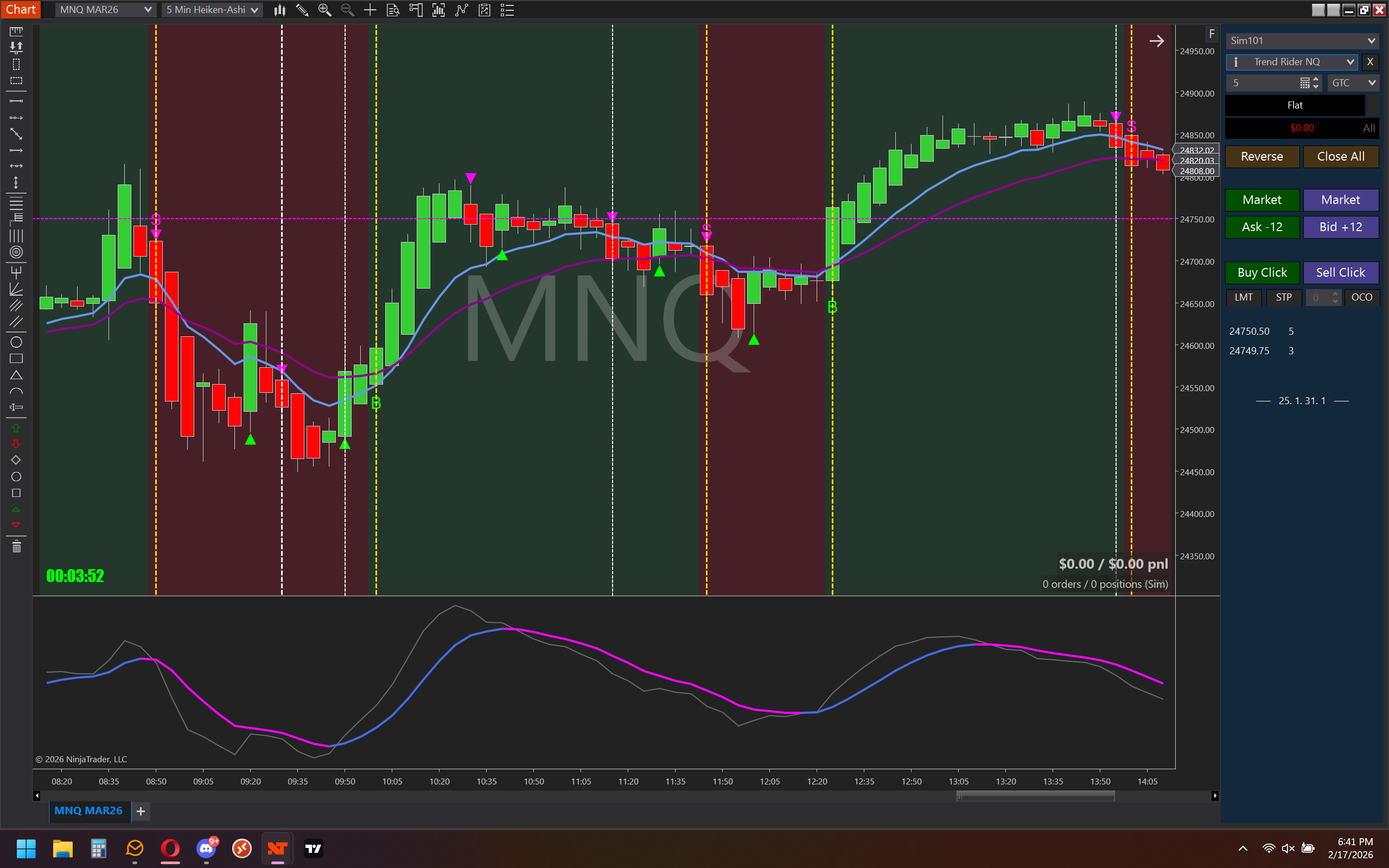
@Ninja_On_The_Roof Ok, I'll bite. Here's my current trading strat. It uses two indicators that I made and really any MACD that you want to use, I use zombie pack. I marked up the entries from today with the gold line being A+ and the white line being a valid entry with more risk. I will also provide my 2 indicators. You will need to place the indicators in bin/custom/indicators folder and compile. You can automate using predator. Trend Rider settings = 5 & .75 / MACD settings = 8, 12, 6 Trend Flip.cs Trend Rider.cs
2 points -
I shared the template couple messages ago1 point
-

Trade Grade / Collapsible Panel Update
Ninja_On_The_Roof reacted to misalto for a topic
Now this trading is getting serious with real helping indicators i know we have brilliant minds here that can develop serious stuff with ai along with their knowledge of the markets thank @chidiroglou1 point -
Usually you have to load the indicator / strategy and then click templates. Obviously there isn’t any to load so just click cancel. This will create the folder then just navigate to your nt8/templates/strategies folder and you should see it.1 point
-

maverickindicators.com
⭐ goldeneagle1 reacted to AllIn for a topic
I **think these are the new ones (please verify), including the radar. Could we get an education on these if so?? https://workupload.com/file/UKb3hz8uyR8 @apmoo @kimsam1 point