⤴️-Paid Ad- Check advertising disclaimer here. Add your banner here.🔥
Leaderboard


Popular Content
Showing content with the highest reputation on 03/29/2026 in all areas
-
Coming soon... "KimSam Ai trading system on ninjatrader " https://ibb.co/0yv6s97K3 points
-

AutoFibIndicator: Could someone please get this indicator working?
KJs reacted to Ninja_On_The_Roof for a topic
Not so sure if setting for renko is at 11/1 a good thing though. When setting for renko type bar typed is at 1, pretty much any signal generated indicators would plot the entries exactly at the start of each turn. Try it. However, in reality, in real live trading, that isnt so since the open and close for renko bar is considered "fake" since it isnt time based but more for price action. For a stand-still chart, an "untrained" trader would think he/she has found the holygrail cuz all the signals plot exactly at each turn, top and bottom. That Reversal bar, or so you think at that moment in live condition, when price is still moving up and down, could end up not become a Reversal bar at all but continue on to go in its original direction. Off note, try TrendHunterAuto. I hear lots of folks claim they have good results as far as for profits. This one, comes into 2 versions. 1 is manually for you to do the job of entering and exiting. The auto one, just need to plug in your own personal target, stop and ATM and it shall go to work once enabled.1 point -
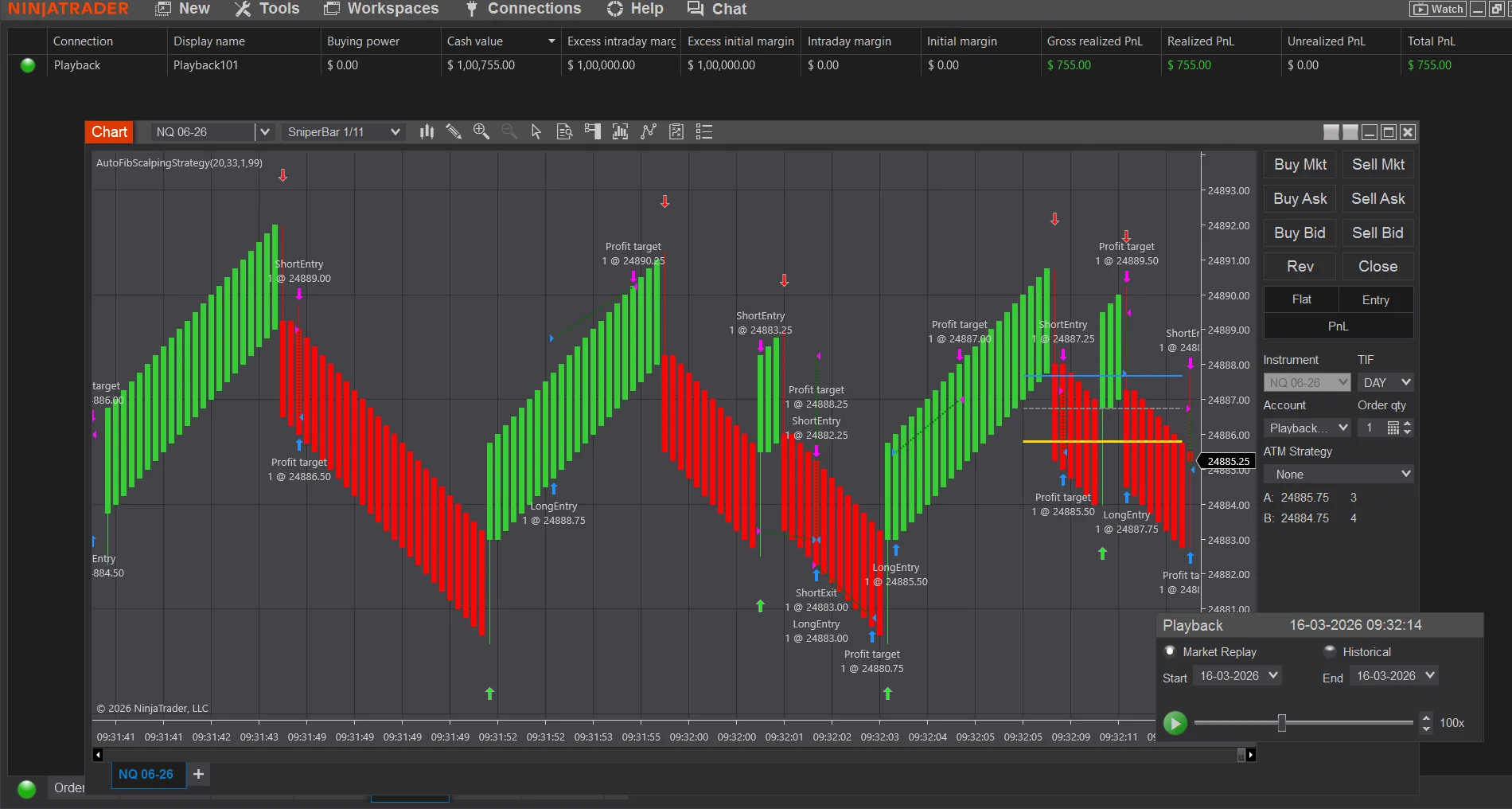
@swiattrader Here is fully Autotrading, AutoFibScalpingStrategy -fully converted NinjaTrader 8 Strategy based on your AutoFibIndicator logic. It trades NQ on 1-11 sniper bars, enters long/short on the 61.8% Fibonacci cross signals, and uses USD-based profit target and stop loss. How to Run Live / Sim Open a 1-11 NQ chart (e.g., NQ 06-25) Right-click chart → Strategies → Select AutoFibScalpingStrategy Set your parameters: Lookback: 20 (default) Quantity: 1 contract Profit Target USD: 33 Stop Loss USD: 99 SniperBar-1/11 Click OK → The strategy will go live and begin trading on signal bars @kimsam @Ninja_On_The_Roof A humble try, requesting improvising, if required🙏 Trade Flow Every bar close, Fib levels are recalculated from the rolling lookback window When price crosses above the 61.8% level → Long entry with PT/SL When price crosses below the 61.8% level → Short entry with PT/SL Opposing signals automatically exit the current position before reversingAutoFibScalpingStrategy.cs Profit target and stop loss orders are managed automatically by NinjaTrader's OCO system
 1 point
 -
KimSam Ai trading system on ninjatrader
misalto reacted to Ninja_On_The_Roof for a topic
Someone please control Kimsam. His A.I stuff is gonna leave everyone...jobless!😂1 point -
LUX ALGO
⭐ Iqbal reacted to Ninja_On_The_Roof for a topic
https://limewire.com/d/TfsDk#oC14QBFBzu1 point -

AutoFibIndicator: Could someone please get this indicator working?
techfo reacted to swiattrader for a topic
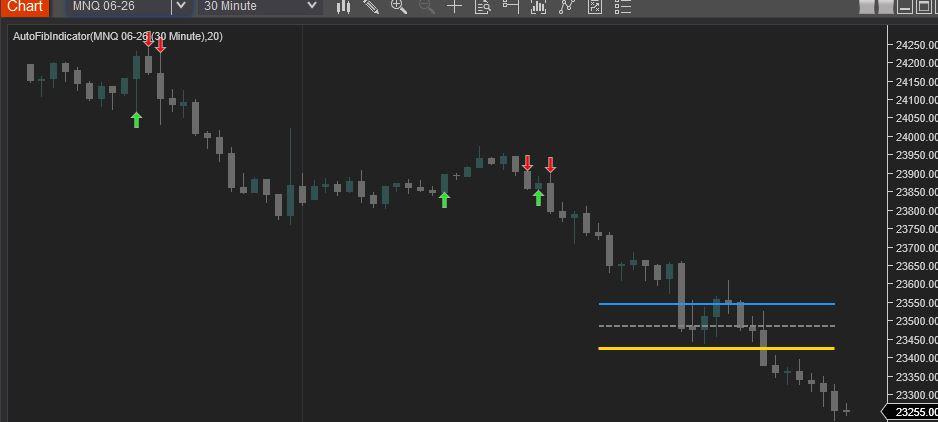
Find below the Revised AutoFibIndicator Script. Attached is a screen shot showing the compiled script (NT8 version: 8.1.6.3 64-bit). Enjoy! #region Using declarations using System; using System.Collections.Generic; using System.ComponentModel; using System.ComponentModel.DataAnnotations; using System.Linq; using System.Text; using System.Threading.Tasks; using System.Windows; using System.Windows.Input; using System.Windows.Media; using System.Xml.Serialization; using NinjaTrader.Cbi; using NinjaTrader.Gui; using NinjaTrader.Gui.Chart; using NinjaTrader.Data; using NinjaTrader.NinjaScript; using NinjaTrader.Core.FloatingPoint; using NinjaTrader.NinjaScript.DrawingTools; #endregion namespace NinjaTrader.NinjaScript.Indicators { public class AutoFibIndicator : Indicator { private MAX maxIndicator; private MIN minIndicator; [NinjaScriptProperty] [Range(1, int.MaxValue)] [Display(Name="Lookback", Order=1, GroupName="Parameters")] public int Lookback { get; set; } #region Color Properties [XmlIgnore] [Display(Name="Fib 38.2 Color", Order=2, GroupName="Colors")] public Brush Fib382Color { get; set; } [Browsable(false)] public string Fib382ColorSerializable { get { return Serialize.BrushToString(Fib382Color); } set { Fib382Color = Serialize.StringToBrush(value); } } [XmlIgnore] [Display(Name="Fib 50.0 Color", Order=3, GroupName="Colors")] public Brush Fib50Color { get; set; } [Browsable(false)] public string Fib50ColorSerializable { get { return Serialize.BrushToString(Fib50Color); } set { Fib50Color = Serialize.StringToBrush(value); } } [XmlIgnore] [Display(Name="Fib 61.8 Color", Order=4, GroupName="Colors")] public Brush Fib618Color { get; set; } [Browsable(false)] public string Fib618ColorSerializable { get { return Serialize.BrushToString(Fib618Color); } set { Fib618Color = Serialize.StringToBrush(value); } } [XmlIgnore] [Display(Name="Long Signal Color", Order=5, GroupName="Colors")] public Brush LongColor { get; set; } [Browsable(false)] public string LongColorSerializable { get { return Serialize.BrushToString(LongColor); } set { LongColor = Serialize.StringToBrush(value); } } [XmlIgnore] [Display(Name="Short Signal Color", Order=6, GroupName="Colors")] public Brush ShortColor { get; set; } [Browsable(false)] public string ShortColorSerializable { get { return Serialize.BrushToString(ShortColor); } set { ShortColor = Serialize.StringToBrush(value); } } #endregion protected override void OnStateChange() { if (State == State.SetDefaults) { Description = @"Automatically plots Fibonacci levels based on a lookback period."; Name = "AutoFibIndicator"; Calculate = Calculate.OnBarClose; IsOverlay = true; DisplayInDataBox = true; DrawOnPricePanel = true; IsSuspendedWhileInactive = true; Lookback = 20; Fib382Color = Brushes.DodgerBlue; Fib50Color = Brushes.Gray; Fib618Color = Brushes.Gold; LongColor = Brushes.Lime; ShortColor = Brushes.Red; } else if (State == State.DataLoaded) { maxIndicator = MAX(High, Lookback); minIndicator = MIN(Low, Lookback); } } protected override void OnBarUpdate() { if (CurrentBar < Lookback) return; double swingHigh = maxIndicator[0]; double swingLow = minIndicator[0]; double range = swingHigh - swingLow; if (range <= 0) return; double fib382 = swingHigh - (range * 0.382); double fib50 = swingHigh - (range * 0.5); double fib618 = swingHigh - (range * 0.618); // Using static tags for lines ensures they "move" with the lookback rather than creating new ones Draw.Line(this, "Fib382", false, Lookback, fib382, 0, fib382, Fib382Color, DashStyleHelper.Solid, 2); Draw.Line(this, "Fib50", false, Lookback, fib50, 0, fib50, Fib50Color, DashStyleHelper.Dash, 2); Draw.Line(this, "Fib618", false, Lookback, fib618, 0, fib618, Fib618Color, DashStyleHelper.Solid, 3); // Signal Logic // Long: Close crosses above 61.8% if (CrossAbove(Close, fib618, 1)) { Draw.ArrowUp(this, "Long" + CurrentBar, true, 0, Low[0] - (5 * TickSize), LongColor); } // Short: Close crosses below 61.8% if (CrossBelow(Close, fib618, 1)) { Draw.ArrowDown(this, "Short" + CurrentBar, true, 0, High[0] + (5 * TickSize), ShortColor); } } } }
1 point -
House Of Live Trades
techfo reacted to Ninja_On_The_Roof for a topic
Over time, your Ninjatrader becomes heavy and filled with junkies day in and day out after using it. I have found this tool to clean up the mess. I think it is very useful. Kinda make your Ninjatrader all fresh and clean again. It also comes with the "auto log-in" function. It is kinda annoying that I would have to punch in my password everytime I log in. Yes, I know. It is for security protection but hey, if you wanna skip this step. Then use it. https://limewire.com/d/datun#k83IR7948G1 point -
House Of Live Trades
techfo reacted to Ninja_On_The_Roof for a topic
Off note, for more than a thousand dollar a piece, I know many of you were itchy to try out the infamous Ninza InfinityAlgo_Engine and, Captain Optimus Strong. Many of you have figured out the right way to make the Infinity works out perfectly. But here for those who truly want to try it. https://limewire.com/d/iA3oi#LKXmoStkwH Be aware that, you gotta give and take. Meaning, these pieces would kill many of your favorite Ninza indicators right off the bat. I didnt have time to go through each of them but I know, the Zephyrus, The OmniScan and the StormEye would work fine with these two, so far, at least. As always, I recommend that you would first go into your documents/bin/custom and copy all the Resource files for Ninza, ones you currently have running. Copy them, save them somewhere, so that if and when you want to switch back to the way you had before with all other Ninza indicators, then just copy them and paste them back into your custom folder. That way, you dont need to uninstall everything to start fresh. Save you a whole lot time. Who knows, maybe you would find these 2 useful to automate all of your other stuff and worthy of giving up a bunch of your other Ninza indicators. Off note once again, for the Infinity to work, you first need to pull up an indicator with signals that you wanna automate it. Then that would show up in the Infinity's setting.1 point -
WiSE Indicator
fxtrader99 reacted to Ninja_On_The_Roof for a topic
https://limewire.com/d/bMZ6q#bL7BAs7TCa1 point -
House Of Live Trades
AllIn reacted to Ninja_On_The_Roof for a topic
Not a bad day for me. I am done for the day. Good trading folks! Stay positive. Stay green guys!🥰1 point -
Sky's MTF Panel
misalto reacted to Ninja_On_The_Roof for a topic
I see that nobody has said anything about this one so let me chime in a bit. I have found out that, at least in my own personal view, that when combine this one with the Maverick Radar, it is quite imppressive. Gives you a much better edge having both aligned. Now, to be honest, I have no clues as to what the Maverick has behind the door, its criteria or concept for giving out the A or B grade. Yes, good to know when you have all the other instruments aligned with one another for direction but based on what, I have no clues. I can only assume looking at the labels of AI, MIX, GD, TR, BB and Q. At least though, I know for sure what the criteria for this Sky MTF is based on, MACD, EMA and Trend. However, for the Maverick grades, they can be flashing and changing even when price is moving within 1 candle. So in a way, you can say, it repaints. It is cool. Thank you to @Chidiroglou! Much appreciated it.1 point -
I use this one OrderLineDecoratorOrderFlowHUB-hjcdfp.zip1 point
-

FlowMatrix
fxtrader99 reacted to kkreig for a topic
https://www.flowmatrix-nt8.com/ FlowMatriXFreePack.rar1 point -

Latest MTP PREDICTOR NT8 ADDON EDU
techfo reacted to fxtrader99 for a topic
I have this original uneducated 8.6.0.1 MTP Addon(contains trade module) and attached the link here. I think there are more recent versions as 8.6.0.1 is from late 2024. https://workupload.com/file/J89cBWwspyc1 point -
https://workupload.com/file/4dXALmJccgC 🙂1 point
-
https://workupload.com/file/gmmwhbjmLcV 🙂1 point
-
1 point
-
Not sure if anyone needs this. Should be educated already. UltimateScalperSuite2.rar1 point
-

Mtpredictor 8.1.1.1 new version
techfo reacted to ⭐ epictetus for a topic
MtPredictor 8.5.3 https://workupload.com/file/xPtCEZTjpsA1 point