⤴️-Paid Ad- Check advertising disclaimer here. Add your banner here.🔥
Leaderboard


Popular Content
Showing content with the highest reputation on 03/13/2026 in Posts
-
https://workupload.com/file/5n6jv6V8vQk @Minigems can u educate this please @redux3 points
-

MotiveWave v7 Ultimate Edition (Mac OS)
⭐ monkeybusiness and 2 others reacted to candyman for a topic
@Dav you can't join and in 4 minutes request something. please help the community any way you can. Show you are here for the right reason .thanks so much3 points -
Opt v 2.2 https://www.4shared.com/s/foLTlSpoMge Opt v 1.6 https://www.4shared.com/s/fg4Gi61Dnge Download both versions. Pass is : 123 First, read install notes as detailed in v 2.2. (Install notes are in text, pic & or pdf files.) Then also read install notes from v 1.6. If you read 2 to 3 times, spend time & understand what you are supposed to do & then install you will have no issues. All the best Regards K2 points
-
Pack 205 NinZa Indicators https://workupload.com/file/rB7xmeWW6z6 First install the indicators, then the resources https://workupload.com/file/fB9HktcxFY71 point
-

fixed .. ORS Fusion and Axios
⭐ SignalTime reacted to kimsam for a topic
thanks for sharing .. https://workupload.com/archive/TQxAXjXS7r1 point -

NT8 GEX Calc
alodante reacted to roddizon1978 for a topic
NT8 GEX Calc Does anybody have this indicator and willing to share1 point -
https://workupload.com/archive/cXJWLszyzZ1 point
-
Motivewave 6.9.9 with free license M4PL-9FW9-CE5Y-YNYA-WZ4A-FFMS https://workupload.com/file/Bems3bhyJSF1 point
-
This slayed today ngl
 1 point
 -
Sorry to spam... can I add latest TDU footprint V20 to the list if you guys planning on working this weekend... 🙂 https://workupload.com/file/FYEsHXYDL5S Much appreciated, adding @kimsam @apmoo @the_evil@Ninja_On_The_Roof1 point
-

Metastock 20 realtime c*****d
Dav reacted to ⭐ Atomo12345 for a topic
Metastock 20 realtime c*****d https://e.pcloud.link/publink/show?code=XZ6qsAZK2otfBPXC0Sn1UJGxn4IL5Do1S9X1 point -
Thank you bro1 point
-
Yes. You should run/deploy "OfflineCache_GeneratorGUI" once every 20 odd days, when ever there is a msg requesting for login "to establish an online connection." Close/exit MS app & run "OfflineCache_GeneratorGUI" & start MS Regards1 point
-
Does anybody have Qpilot for NT?
1 point
-
Here! TDUTMABandsScalper.zip1 point
-

kissorderflow.com
Minigems reacted to ⭐ laser1000it for a topic
well done ! I worked on it about 2 days (for fun, even though I don't use NT8) unfortunately without success....old v2128 is a bit flakly if working to ITA Euro BTP or Fib MiniFib, I prefer my TW script developed with Antigravity1 point -

DTTW - Atlas Line
⭐ SignalTime reacted to Ninja_On_The_Roof for a topic
As for the AtlasLine, I recall that I posted it days ago somewhere. If you still need it, please let me know. I do not use it personally but hey, it is a good tool to inform you to stay with the same direction of the move. The ATO is just pretty much ORB strategy. When I first started out trading many years ago, I did buy the course. They didnt have the indicator for it back then. Just a PDF course that shows you in details how to trade it. If I recall it correctly, at 06:30AM (my Pacific time zone, for you, might be 09:30AM), you draw a vertical line at this time then at 06:52AM, you draw another vertical line at this time. Draw a horizon line for the high and the low from these two time zone. You then sit and wait for price to break out from either sides, high or low level. Then place a limit order at the exact level where price broke out, or just a tick or two from the levels. The idea here is to have price to pull back and fill you with your limit order. Target and stop, for DTTW, has always been the ATR. They set it at 4, instead of the default of 14. Round up the number a tad. Let's say, the ATR show 2.45. You would say, it is 2 points and a half. The point here is, if the ATR tells you the anticipated move is about 2 and a half point, but you decide to have your target for 5 points, then you might not see or reach that. Same idea for stop. The anticipated move, up or down is 2 and a half points but you place your stoploss for only 1 and a half point. Then you might just get whacked in the head. Regardless, to trade it correctly with DTTW stuff, when it comes to their stoplosses, they have a few different types of them. Such as time based stop. Once you are in a trade, your trade goes nowhere and there are already 5 candles or more from your entry point, it might just be time to exit for a break even or a small loss. They want to be in and out as quickly as possible. There is also another called "catastrophic stop" and more... Do watch many of their videos on YouTube to get the overall ideas so you can trade effectively.🥰 As far as for the Scalper. If you look to the left of your chart, you will see why the signals are fired. It is a break out of your left. Whether it is a support or a resistance.1 point -

ninjastrategyloader.com
⭐ SignalTime reacted to ampf for a topic
I think this will be good to help confirm trades https://www.ninjastrategyloader.com/turning-point-indicator/ https://www.ninjastrategyloader.com/nsl-market-depth-order-flow-for-ninjatrader-8/ https://www.ninjastrategyloader.com/nslriskmanager/ @apmoo Can you help here? Thank you NSL_Market_Depth_Order_Flow.zip NSL_Trade_Exit_Manager.zip Turning_Points_Indicator.zip1 point -

ninjastrategyloader.com
⭐ goldeneagle1 reacted to Minigems for a topic
Here you go. Cheers: https://workupload.com/archive/58UXLRJNrC1 point -

DTTW - Atlas Line
⭐ SignalTime reacted to lis22 for a topic
THEY NEED TO BE EDU @apmoo@kimsam@N9T@redux DTTW8AtlasLine.cs DTTW8AtlasLine.dll DTTW8ATO2.cs DTTW8ATO2.dll DTTW8Multilines.cs DTTW8Multilines.dll DTTW8News4.cs DTTW8News4.dll DTTW8Roadmap.cs DTTW8Roadmap.dll DTTW8TradeScalper4.cs DTTW8TradeScalper4.dll1 point -
dimensiontrader
techfo reacted to Ninja_On_The_Roof for a topic
https://workupload.com/file/7CZKtxBtVgf1 point -

S M M - NT8
⭐ SignalTime reacted to omni69 for a topic
SMM_Dots.zip SMM_HA_ATR.zip SMM_Latest.zip1 point -

CopierLite_V2
⭐ SignalTime reacted to Jack for a topic
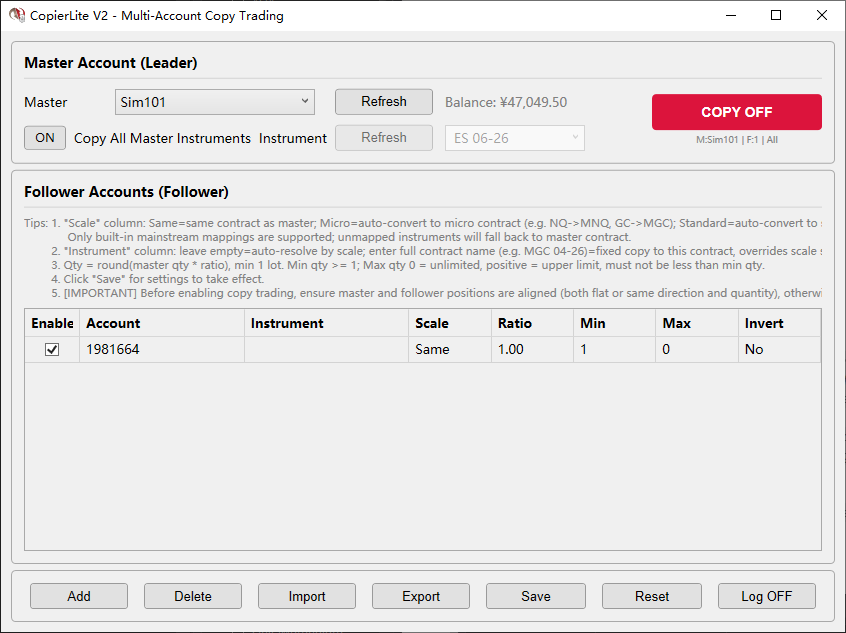
CopierLite V2 is a lightweight NinjaTrader 8 copy-trading plugin (AddOn) for implementing "one-master, multi-follower" multi-account linked ordering within the same platform. Runs in a standalone window, no chart required. Core Features: * When the master account places an order, it is automatically copied to one or more follower accounts * Supports same-instrument copy, cross-instrument copy (e.g. NQ -> MNQ) * NEW: Scale auto-conversion (Same / Micro / Standard), no manual contract name entry needed * Supports quantity multiplier (0.5x / 1x / 2x ...) * Supports reverse copy-trading (master goes long, follower goes short) * Supports min/max quantity limits * Ultra-fast direct-through trigger (OnOrderUpdate: Market orders forwarded on Submitted / Limit & Stop orders forwarded on Filled) * Direct-through forwarding, no follower position checks, zero delay, zero decision-making * Standalone window, launch from Control Center > New > CopierLite Copy Trading * Interface uses fixed light theme (does not follow system dark/light switching) * Settings persisted to file, automatically restored after NinjaTrader restart V1 -> V2 Key Changes: * Indicator -> AddOn: no chart needed, standalone window operation * Added scale auto-conversion (Micro/Standard) * Added instrument filter dropdown (supports input + dropdown for common contracts) * Balance info moved to right of master account dropdown, COPY toggle moved to upper right * Interface uses fixed light theme for consistent cross-environment visuals * Settings file persistence (Documents/NinjaTrader 8/AddOns/CopierLite_settings.cfg) CopierLite_User_Manual.txt CopierLite_V2.zip
1 point -

A+ Setups
⭐ SignalTime reacted to Gagirl for a topic
A_PlusPOC_2.4.1 (2).zipA+ Setups CentreLine and GHL ColorBars NT8 Template.zip NOTE: There are sub folders in these.1 point -

anyone have Hameral orderflow version prenium please
⭐ SignalTime reacted to TrooperBra for a topic
Basic Pack HameralOrderFlowBasicPackV1.4.zip Volprofilrabie.zip1 point -

FLEX TOP BY NINZA.co
⭐ SignalTime reacted to raock95 for a topic
NinZaFlexTPO_NT8.zip1 point -

NinZa RMA Crossover
⭐ SignalTime reacted to Eva Grey for a topic
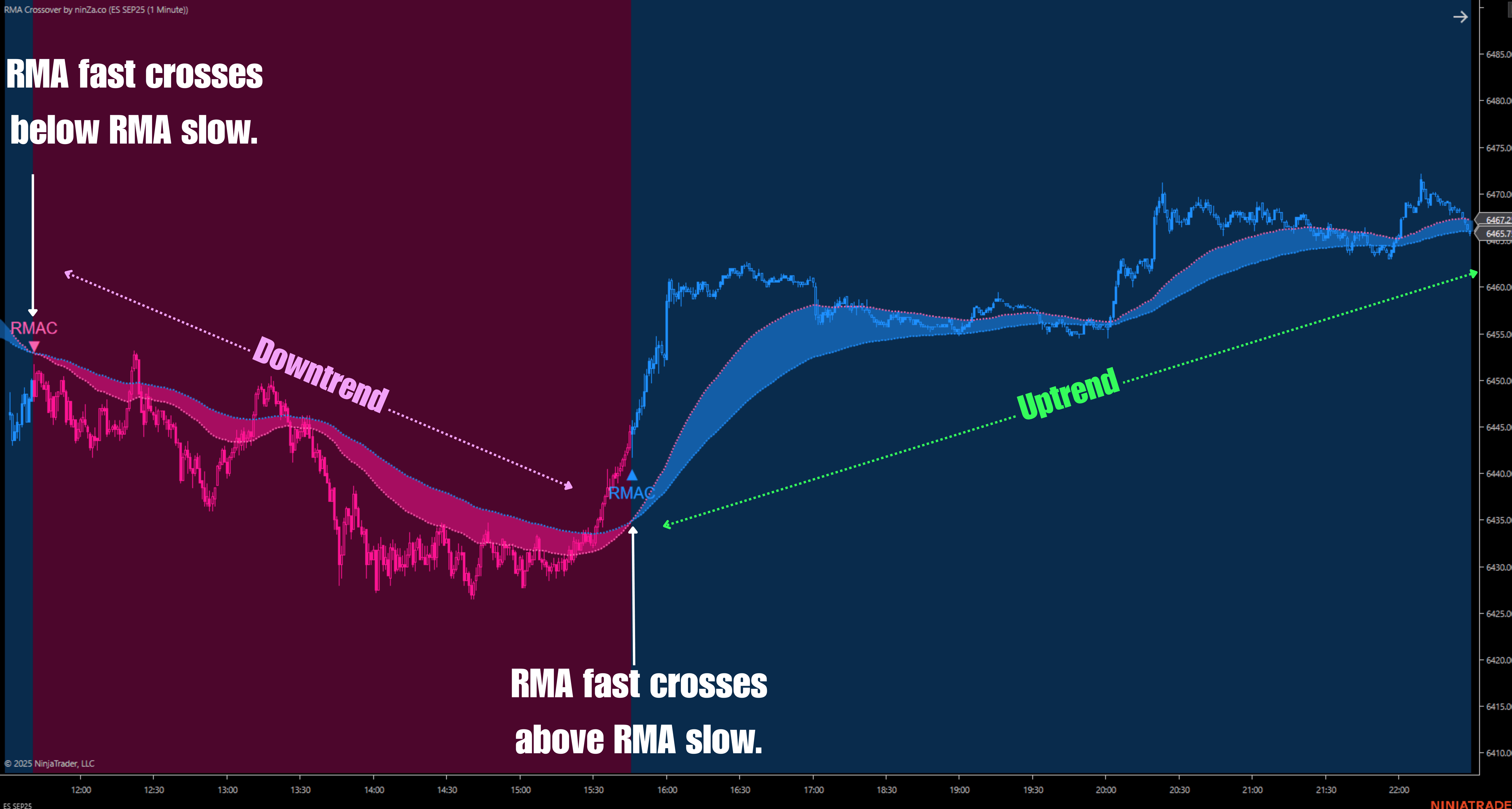
https://workupload.com/file/DPDyDpZV9UY
1 point -
Metastock 20 realtime c*****d
⭐ suresh.hacker reacted to ⭐ Atomo12345 for a topic
Here are Mediafire links. Metastock 20 real time: https://www.mediafire.com/file/p6nu5f7fomrc0g1/MSRT20-00-25310.zip/file Crack: https://www.mediafire.com/file/67g34shacu4v2k2/Metastock+20+R.T.+GUI+crack.zip/file1 point -

buysideglobal.com
Harrys reacted to LoneBladeRGC for a topic
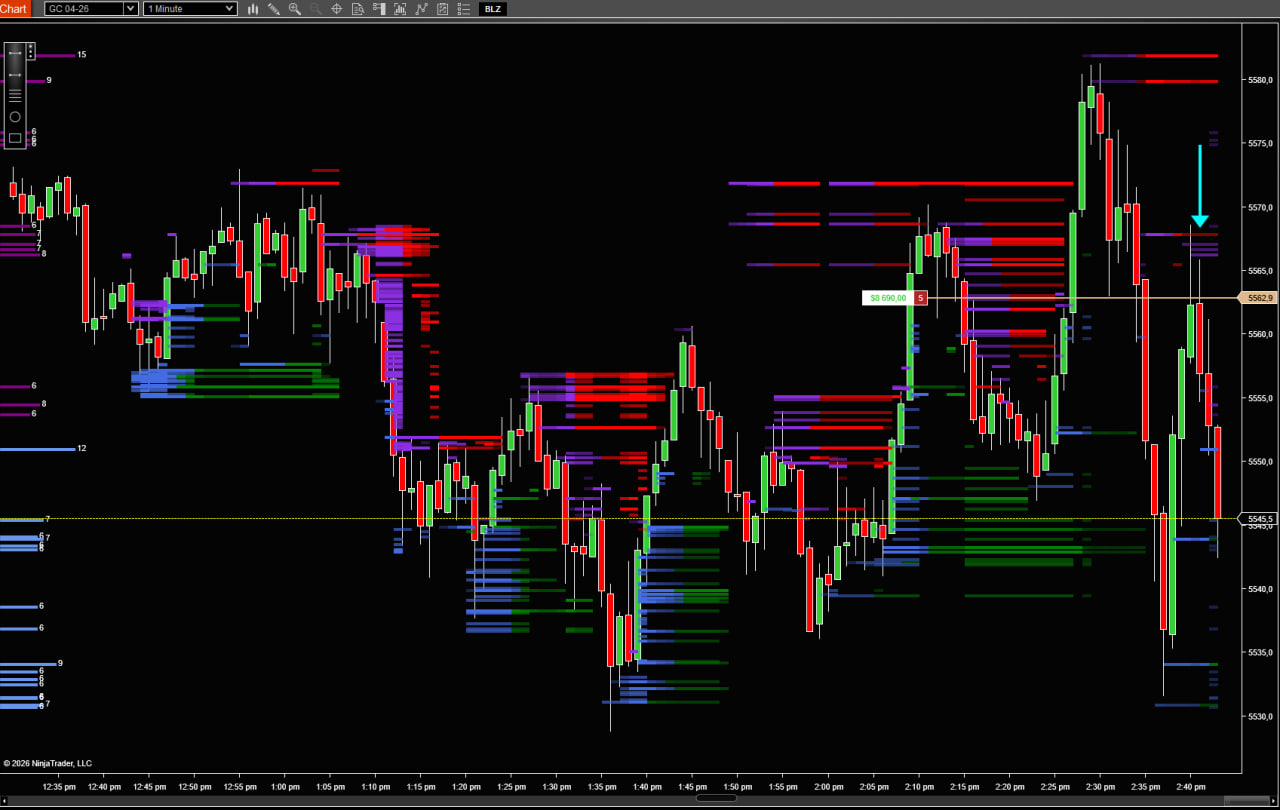
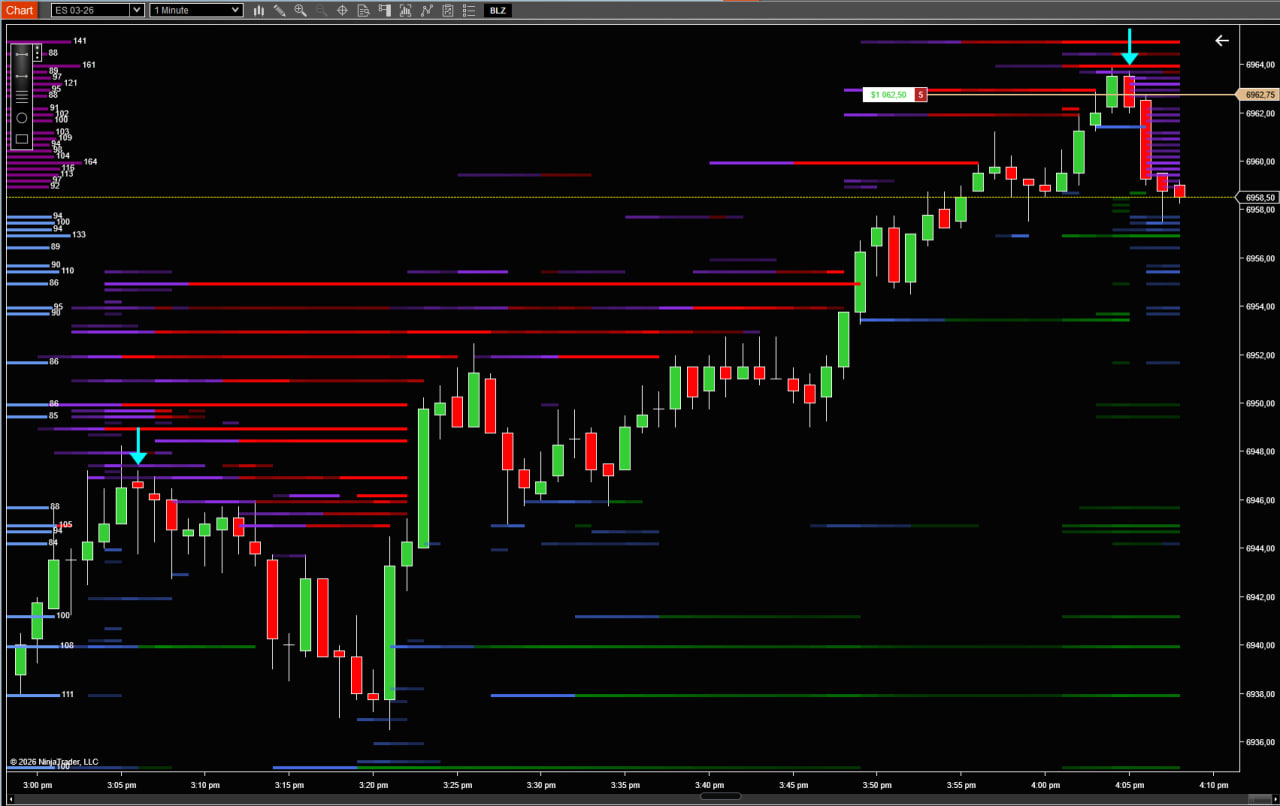
Just to add on, the first photo is a safer trade as the liquidity has been taken out (same level as my entry) the second photo is a more risky trade as it's a fade entry off the top edge.
1 point -
buysideglobal.com
Harrys reacted to LoneBladeRGC for a topic
I actually do. See the liquidity coming above you? I have sellers above me. I can now join in confidently knowing that I'm not selling alone. Another example See how they ran the liquidity at the top and filled in behind immediately afterwards. That's an instant sell. This is how I trade manually, all taken from my personal trade journal. Just to give some ideas as this community has given me much help.
1 point -
ninjastrategyloader.com
⭐ SignalTime reacted to ampf for a topic
MeanRenko.zip1 point -
Convert2MS 2.2 cracked
⭐ suresh.hacker reacted to ⭐ Atomo12345 for a topic
The settings for Convert2MS 2.1. Settings.docx1 point -
Convert2MS 2.2 cracked
⭐ suresh.hacker reacted to ⭐ Atomo12345 for a topic
The rigth version Convert2MS 2.1 cracked by me. Download the data from Yahoo with AmiQuote 4.15. The data are in format .aqh. In Convert2MS open the file data.cfg. https://www.sendspace.com/file/l1ms01 Set the Path to output file where you want to put the data in Metastock format (the path predefined is "C:\Users\Atomo\Download\Dati"). It is a little boring because you must open any single file .aqh and then press convert in Convert2MS. At the end you have all the data converted in Metastock format. Greetings. Convert2MetaStock 2.1.rar1 point