⤴️-Paid Ad- Check advertising disclaimer here. Add your banner here.🔥
Leaderboard

Popular Content
Showing content with the highest reputation on 03/29/2026 in all areas
-

KimSam Ai trading system on ninjatrader
Spellbound21 and 4 others reacted to kimsam for a topic
Coming soon... "KimSam Ai trading system on ninjatrader " https://ibb.co/0yv6s97K5 points -

LUX ALGO
amruta and 2 others reacted to Ninja_On_The_Roof for a topic
https://limewire.com/d/TfsDk#oC14QBFBzu3 points -
Sky's MTF Panel
⭐ QuBit and 2 others reacted to Ninja_On_The_Roof for a topic
I see that nobody has said anything about this one so let me chime in a bit. I have found out that, at least in my own personal view, that when combine this one with the Maverick Radar, it is quite imppressive. Gives you a much better edge having both aligned. Now, to be honest, I have no clues as to what the Maverick has behind the door, its criteria or concept for giving out the A or B grade. Yes, good to know when you have all the other instruments aligned with one another for direction but based on what, I have no clues. I can only assume looking at the labels of AI, MIX, GD, TR, BB and Q. At least though, I know for sure what the criteria for this Sky MTF is based on, MACD, EMA and Trend. However, for the Maverick grades, they can be flashing and changing even when price is moving within 1 candle. So in a way, you can say, it repaints. It is cool. Thank you to @Chidiroglou! Much appreciated it.3 points -
AutoFibIndicator: Could someone please get this indicator working?
techfo and one other reacted to Ninja_On_The_Roof for a topic
Sorry, I forgot to include the files. These came from PropTraderz. I once was in their Discord channel. It was a great group. They posted indicators/strats/bots and also discussed them, trying to improve things. But at one point, they were flagged in violation by Discord for posting third party stuff. So everything was stopped. Then if you needed something, you would have to privately IM someone in the group. It apparently became inconvenient so I left. This is pretty much supertrend based, in my view. I made my own bot based on ST years ago using NT strategy builder and applying on Renko chart. It was simple but definitely fun hearing the "ka-ching" sound when targets got hit. I also ran the backtesting/analyzer for it. I found out it worked much better when having smaller targets, as you all know, ST works great and perfect in trending market but it would chop you left and right in a whipsaw market. By decreasing the target down a notch, it would manage to capture that whole target before it is then whipsawed back back and forth. Obviously, nothing is 100% bullet proof. That is a given. So if you expect to pull up a chart and then see all the winners, you certainly won't. Regardless, if you catch one or two good runs and there are, almost every trading day, around certain or specify times, you should be done for the day and go spend time with your family. With smaller profit targets, one at a time, in choppy days, I think, you might be able to still hit your targets decently. Some of you, might find this useful for your trading, or to add an extra layer to your own arsenal. It is simple, clean and light weight. You can certainly play with its setting for the sensitivity, however you want. I wholeheartedly believe this til this very day, "one man's trash is another man's gold". Someone, somewhere, will always find something useful and helpful and, profitable, whilst others have no success with it at all. Not to say that this one I posted here is "trash". I personally like it. For me, it is good to stay on the overall, same side of ST. TDU also has decent indicators for these purposes. Bluewave Trading is also cool for this, as well as AbleSys. For the auto bot, just plug in your own stoploss and profit and ATM. Or, if you wanna let the bot enter on its own then you manage your stoploss manually by trailing it using its trailing dots/harsh. Not recommend this way using bars that have crazy long extended wicks. You would get stopped out only to see your trades continue to go on without you. I am currently trying to set up a bot using the Ninza SolarWave (Nova). Not for its usual and main signals but only for the pullback signals right after its Trend signals. I find them pullback signals useful. Off note, I also find Tony Rogos Golden setup quite liberating. Price often approaches these levels on the dots and reacts to them precisely. I still use this til this very day, not just for potential entries but also for potential target areas. https://workupload.com/archive/D9RHUt4hUH Good trading guys! Together, we little fish, little retailers, shall make it through.🤗 One day at a time! https://limewire.com/d/l6hrZ#cYK9b4EnGQ2 points -
House Of Live Trades
pygmalion5000 and one other reacted to Ninja_On_The_Roof for a topic
Over time, your Ninjatrader becomes heavy and filled with junkies day in and day out after using it. I have found this tool to clean up the mess. I think it is very useful. Kinda make your Ninjatrader all fresh and clean again. It also comes with the "auto log-in" function. It is kinda annoying that I would have to punch in my password everytime I log in. Yes, I know. It is for security protection but hey, if you wanna skip this step. Then use it. https://limewire.com/d/datun#k83IR7948G2 points -
WiSE Indicator
amruta and one other reacted to Ninja_On_The_Roof for a topic
https://limewire.com/d/bMZ6q#bL7BAs7TCa2 points -
chatgpt is dumb asf1 point
-
AutoFibIndicator: Could someone please get this indicator working?
KJs reacted to Ninja_On_The_Roof for a topic
Not so sure if setting for renko is at 11/1 a good thing though. When setting for renko type bar typed is at 1, pretty much any signal generated indicators would plot the entries exactly at the start of each turn. Try it. However, in reality, in real live trading, that isnt so since the open and close for renko bar is considered "fake" since it isnt time based but more for price action. For a stand-still chart, an "untrained" trader would think he/she has found the holygrail cuz all the signals plot exactly at each turn, top and bottom. That Reversal bar, or so you think at that moment in live condition, when price is still moving up and down, could end up not become a Reversal bar at all but continue on to go in its original direction. Off note, try TrendHunterAuto. I hear lots of folks claim they have good results as far as for profits. This one, comes into 2 versions. 1 is manually for you to do the job of entering and exiting. The auto one, just need to plug in your own personal target, stop and ATM and it shall go to work once enabled.1 point -
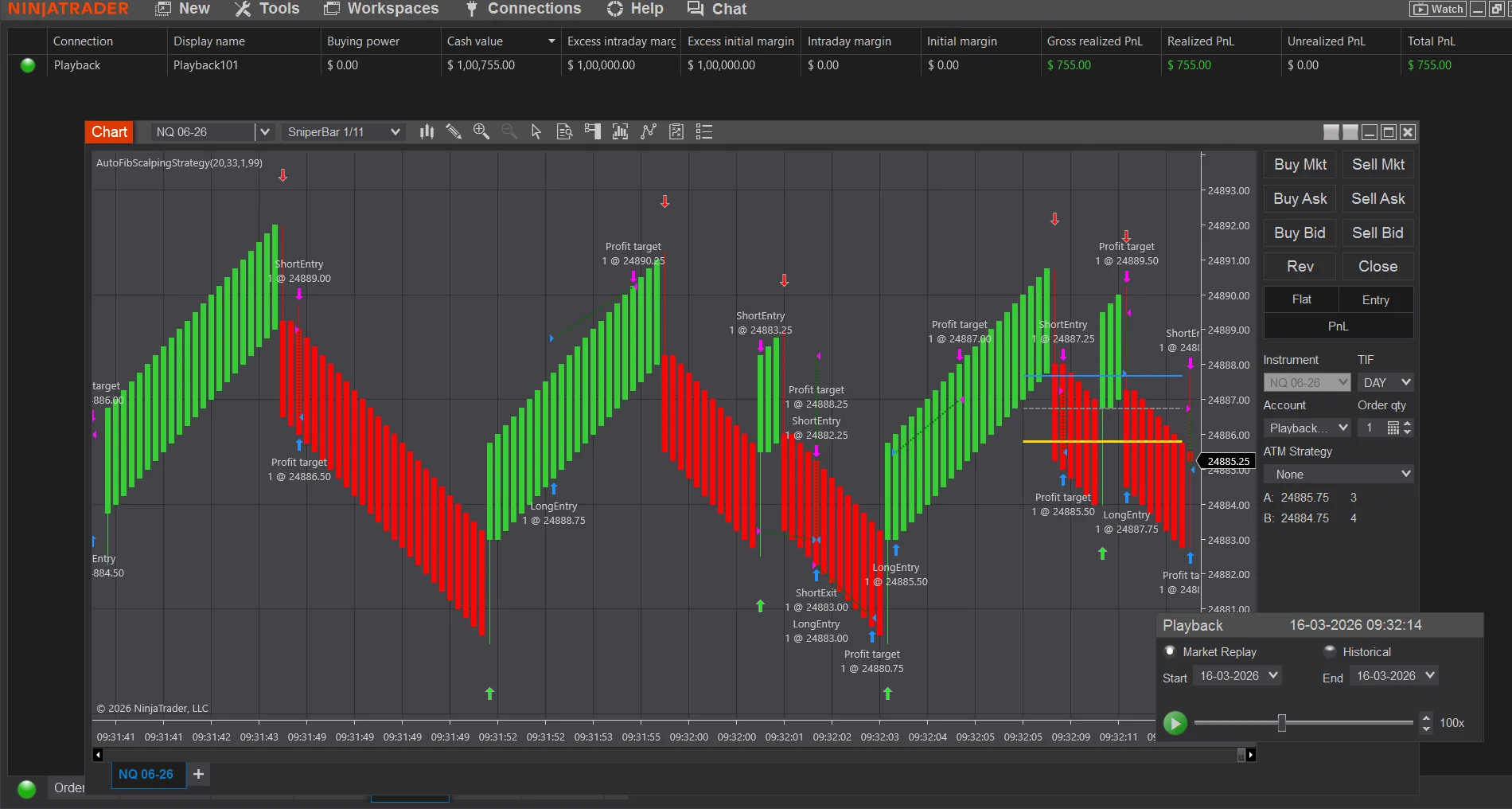
@swiattrader Here is fully Autotrading, AutoFibScalpingStrategy -fully converted NinjaTrader 8 Strategy based on your AutoFibIndicator logic. It trades NQ on 1-11 sniper bars, enters long/short on the 61.8% Fibonacci cross signals, and uses USD-based profit target and stop loss. How to Run Live / Sim Open a 1-11 NQ chart (e.g., NQ 06-25) Right-click chart → Strategies → Select AutoFibScalpingStrategy Set your parameters: Lookback: 20 (default) Quantity: 1 contract Profit Target USD: 33 Stop Loss USD: 99 SniperBar-1/11 Click OK → The strategy will go live and begin trading on signal bars @kimsam @Ninja_On_The_Roof A humble try, requesting improvising, if required🙏 Trade Flow Every bar close, Fib levels are recalculated from the rolling lookback window When price crosses above the 61.8% level → Long entry with PT/SL When price crosses below the 61.8% level → Short entry with PT/SL Opposing signals automatically exit the current position before reversingAutoFibScalpingStrategy.cs Profit target and stop loss orders are managed automatically by NinjaTrader's OCO system
 1 point
 -
KimSam Ai trading system on ninjatrader
sarutobi reacted to Ninja_On_The_Roof for a topic
Someone please control Kimsam. His A.I stuff is gonna leave everyone...jobless!😂1 point -

AutoFibIndicator: Could someone please get this indicator working?
techfo reacted to swiattrader for a topic
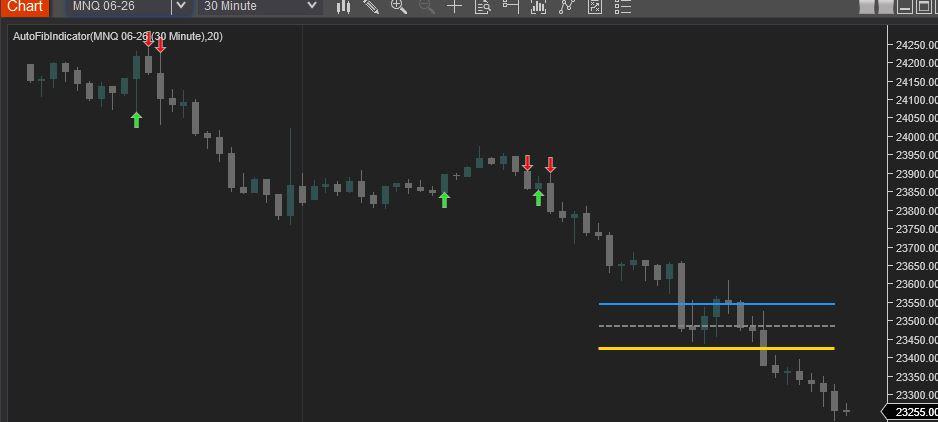
Find below the Revised AutoFibIndicator Script. Attached is a screen shot showing the compiled script (NT8 version: 8.1.6.3 64-bit). Enjoy! #region Using declarations using System; using System.Collections.Generic; using System.ComponentModel; using System.ComponentModel.DataAnnotations; using System.Linq; using System.Text; using System.Threading.Tasks; using System.Windows; using System.Windows.Input; using System.Windows.Media; using System.Xml.Serialization; using NinjaTrader.Cbi; using NinjaTrader.Gui; using NinjaTrader.Gui.Chart; using NinjaTrader.Data; using NinjaTrader.NinjaScript; using NinjaTrader.Core.FloatingPoint; using NinjaTrader.NinjaScript.DrawingTools; #endregion namespace NinjaTrader.NinjaScript.Indicators { public class AutoFibIndicator : Indicator { private MAX maxIndicator; private MIN minIndicator; [NinjaScriptProperty] [Range(1, int.MaxValue)] [Display(Name="Lookback", Order=1, GroupName="Parameters")] public int Lookback { get; set; } #region Color Properties [XmlIgnore] [Display(Name="Fib 38.2 Color", Order=2, GroupName="Colors")] public Brush Fib382Color { get; set; } [Browsable(false)] public string Fib382ColorSerializable { get { return Serialize.BrushToString(Fib382Color); } set { Fib382Color = Serialize.StringToBrush(value); } } [XmlIgnore] [Display(Name="Fib 50.0 Color", Order=3, GroupName="Colors")] public Brush Fib50Color { get; set; } [Browsable(false)] public string Fib50ColorSerializable { get { return Serialize.BrushToString(Fib50Color); } set { Fib50Color = Serialize.StringToBrush(value); } } [XmlIgnore] [Display(Name="Fib 61.8 Color", Order=4, GroupName="Colors")] public Brush Fib618Color { get; set; } [Browsable(false)] public string Fib618ColorSerializable { get { return Serialize.BrushToString(Fib618Color); } set { Fib618Color = Serialize.StringToBrush(value); } } [XmlIgnore] [Display(Name="Long Signal Color", Order=5, GroupName="Colors")] public Brush LongColor { get; set; } [Browsable(false)] public string LongColorSerializable { get { return Serialize.BrushToString(LongColor); } set { LongColor = Serialize.StringToBrush(value); } } [XmlIgnore] [Display(Name="Short Signal Color", Order=6, GroupName="Colors")] public Brush ShortColor { get; set; } [Browsable(false)] public string ShortColorSerializable { get { return Serialize.BrushToString(ShortColor); } set { ShortColor = Serialize.StringToBrush(value); } } #endregion protected override void OnStateChange() { if (State == State.SetDefaults) { Description = @"Automatically plots Fibonacci levels based on a lookback period."; Name = "AutoFibIndicator"; Calculate = Calculate.OnBarClose; IsOverlay = true; DisplayInDataBox = true; DrawOnPricePanel = true; IsSuspendedWhileInactive = true; Lookback = 20; Fib382Color = Brushes.DodgerBlue; Fib50Color = Brushes.Gray; Fib618Color = Brushes.Gold; LongColor = Brushes.Lime; ShortColor = Brushes.Red; } else if (State == State.DataLoaded) { maxIndicator = MAX(High, Lookback); minIndicator = MIN(Low, Lookback); } } protected override void OnBarUpdate() { if (CurrentBar < Lookback) return; double swingHigh = maxIndicator[0]; double swingLow = minIndicator[0]; double range = swingHigh - swingLow; if (range <= 0) return; double fib382 = swingHigh - (range * 0.382); double fib50 = swingHigh - (range * 0.5); double fib618 = swingHigh - (range * 0.618); // Using static tags for lines ensures they "move" with the lookback rather than creating new ones Draw.Line(this, "Fib382", false, Lookback, fib382, 0, fib382, Fib382Color, DashStyleHelper.Solid, 2); Draw.Line(this, "Fib50", false, Lookback, fib50, 0, fib50, Fib50Color, DashStyleHelper.Dash, 2); Draw.Line(this, "Fib618", false, Lookback, fib618, 0, fib618, Fib618Color, DashStyleHelper.Solid, 3); // Signal Logic // Long: Close crosses above 61.8% if (CrossAbove(Close, fib618, 1)) { Draw.ArrowUp(this, "Long" + CurrentBar, true, 0, Low[0] - (5 * TickSize), LongColor); } // Short: Close crosses below 61.8% if (CrossBelow(Close, fib618, 1)) { Draw.ArrowDown(this, "Short" + CurrentBar, true, 0, High[0] + (5 * TickSize), ShortColor); } } } }
1 point -
House Of Live Trades
techfo reacted to Ninja_On_The_Roof for a topic
Off note, for more than a thousand dollar a piece, I know many of you were itchy to try out the infamous Ninza InfinityAlgo_Engine and, Captain Optimus Strong. Many of you have figured out the right way to make the Infinity works out perfectly. But here for those who truly want to try it. https://limewire.com/d/iA3oi#LKXmoStkwH Be aware that, you gotta give and take. Meaning, these pieces would kill many of your favorite Ninza indicators right off the bat. I didnt have time to go through each of them but I know, the Zephyrus, The OmniScan and the StormEye would work fine with these two, so far, at least. As always, I recommend that you would first go into your documents/bin/custom and copy all the Resource files for Ninza, ones you currently have running. Copy them, save them somewhere, so that if and when you want to switch back to the way you had before with all other Ninza indicators, then just copy them and paste them back into your custom folder. That way, you dont need to uninstall everything to start fresh. Save you a whole lot time. Who knows, maybe you would find these 2 useful to automate all of your other stuff and worthy of giving up a bunch of your other Ninza indicators. Off note once again, for the Infinity to work, you first need to pull up an indicator with signals that you wanna automate it. Then that would show up in the Infinity's setting.1 point -
Fixed ... QPilotPro_1_0_1_0
lastpago reacted to Ninja_On_The_Roof for a topic
I think you could automate this one. I dont see any issues automating it with PredatorX or other known software. On a side note, I do actually like this QPilot Pro. It is light, easy on the eyes and most importantly, it produces good signals. I also like the panel, works great combined with posted Maverick Radar and Sky's MTF Panel. The only thing I did was to uncheck the Target and Volume Peak. They are just cluttering and clouding the chart. Since I have my own targets set in mind and with other indicators to guide me with the potential targets, I just dont need to have QPilot's targets and Volume Exhaustion. This, cleans up the chart a little bit. But this is just me. Nothing wrong keeping them if you feel like you actually need them there. Just my humble 5 cents worth.🤩1 point -
House Of Live Trades
AllIn reacted to Ninja_On_The_Roof for a topic
Not a bad day for me. I am done for the day. Good trading folks! Stay positive. Stay green guys!🥰1 point -

Trader Dale OrderFlow Indicator Request
⭐ osijek1289 reacted to Bill A for a topic
might be in here MEGA1 point -

Sky's MTF Panel
KJs reacted to Chidiroglou for a topic
Sky_MTF-Panel.zip1 point -
@apmoo @kimsam any chance to educate QuantVue QtimeRenko, please? https://workupload.com/file/UbKWTqh7XPR1 point
-
I use this one OrderLineDecoratorOrderFlowHUB-hjcdfp.zip1 point
-

FlowMatrix
fxtrader99 reacted to kkreig for a topic
https://www.flowmatrix-nt8.com/ FlowMatriXFreePack.rar1 point -

Latest MTP PREDICTOR NT8 ADDON EDU
techfo reacted to fxtrader99 for a topic
I have this original uneducated 8.6.0.1 MTP Addon(contains trade module) and attached the link here. I think there are more recent versions as 8.6.0.1 is from late 2024. https://workupload.com/file/J89cBWwspyc1 point -
Ultimate Backdoor Indicator from ultimatescalper.com
bingojingo reacted to Ninja_On_The_Roof for a topic
https://workupload.com/archive/XqE2QHpEVg1 point -
https://workupload.com/file/4dXALmJccgC 🙂1 point
-
https://workupload.com/file/gmmwhbjmLcV 🙂1 point
-
1 point
-
Not sure if anyone needs this. Should be educated already. UltimateScalperSuite2.rar1 point
-

Mtpredictor 8.1.1.1 new version
techfo reacted to ⭐ epictetus for a topic
MtPredictor 8.5.3 https://workupload.com/file/xPtCEZTjpsA1 point