⤴️-Paid Ad- Check advertising disclaimer here. Add your banner here.🔥
All Activity
- Past hour
-
@Ninja_On_The_Roof i removed all ninja co indiactors and re- installed but they also stopped working, may be due to resource file. I removed the Hellowin Captain Optimus and Infinity trend and Installed Capt Optimus strong with resource file came along with it. But now sumo pull back and RENKOKINGS solar wave RK indicators are not working, may be resource file change, removed and reinstalled by clicking NO to stop overwriting the resource file came with Capt Optimus but now indicators are not working, May be problem is with indicators/ resource files. Asking one more favour, Please share only two indicators- Solar wave and Sumo Pull Back. I dont have any ATM, Just applying indicators, then applying Capt optimus, but till now, no cos visible.
-
Okie...1 step back. 1. First. Pull up on your chart any of your fav Ninza indicator. 2. Pull up Captain Optimus. In its setting, make sure you uncheck the "SESSIONS MANAGEMENT" or if you wanna use that, then adjust the times below to match your time zone. 3. Click that green top portion from COS panel. 4. Pull up the Ninza indicator that you have on your chart. 5. Scroll down from Properties. Look at the "PLOT". Change it to "SIGNAL: TRADE" 6. Click OK to close it. Then click F5 to activate it. You should now see the word "COS" on your chart at your indicators signals. 7. Back to COS panel. Click LONG and SHORT. (You should now see top right corner of chart in orange color for BUY/SELL/MTK (or your chosen order order type/contract size and "when a signal appears") 8. Choose your type of order: market or limit... 9. Choose your contract size. 10. Choose your account. Choose your own ATM you created. 11. Now, just a matter of waiting for her to go to work on her own. If any of your Ninza indicators you use that have Trend signals and you want COS to take these signals instead, then again, change the PLOT to "signal:trend". This is a weakness part of COS as it can only work with indicators that have some sort of "signal" for buy sell. Or else, you won't see those indicators when using COS. And, quitting is not an option!🤗
- Today
-
 RamAli reacted to a post in a topic:
GammaSniperProV1
RamAli reacted to a post in a topic:
GammaSniperProV1
-
@Ninja_On_The_Roof Yes. Refreshed. Really fed up, watching youtube videos, feeling struck🙁
-
Did you press F5 after everything else?
-
Thanks
-
kimsam reacted to a post in a topic:
NTOptimizer
-
Thanks for sharing .. can u please add *auto login function .. and if u can add function that can *re enable strategies .. I'm sure it can be added ..
-
thanks guy!!!
-
@Ninja_On_The_Roof Thanks for revert. No, COS is not visible on chart, while applying i checked settings and enabled it. repeated thrice., Long short is appearing when I add indicators but no auto trading. Long short is checked. I practiced sniper bar for almost one year as I had paid subscription since Mid of 2024. So, it is deeply rooted into hippocampus🧠. What should I do with Captain Optimus as it still refuses to salute the chart🫡. removed and installed , checked settings, Youtube resources are also not saying anything about this glitch.
-
 New link: https://e.pcloud.link/publink/show?code=XZbRKtZkB9sAqqPSiL07Ja8z43rXViFNX0V
 -
Here you are. Wave59 2.33 whit Cycles 2.0. https://workupload.com/file/8uQd3jsPHN3
-
Share the file for it?
-
thank you brother
-
⭐ option trader reacted to a post in a topic:
NTOptimizer
-
axsx reacted to a post in a topic:
GammaSniperProV1
-
fxzero.dark reacted to a post in a topic:
House Of Live Trades
-
 Agontuk77 joined the community
 -
fxzero.dark reacted to a post in a topic:
kissorderflow.com
-
@Minigems don t forget please
-
@kimsam Can you please post the latest kimsamgex when you get time. Thanks
-
 Link isnt expired. It is there with Eve's latest 205 package. Everything is in there.
 -
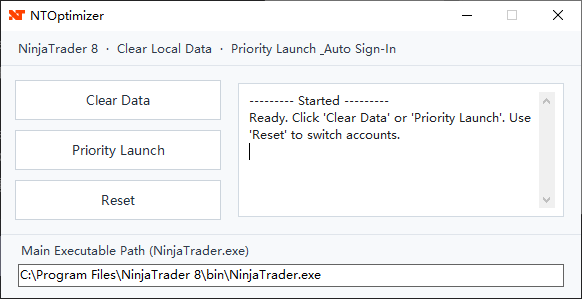
A Windows utility for **NinjaTrader 8.1.x**: The product name, program name, project, and namespace are all **NTOptimizer**, and the compiled output is **NTOptimizer.exe**. The program targets **.NET Framework 4.8**. It primarily does two things: 1. Cleans up the local cache/database directory under **`Documents\NinjaTrader 8\`**. 2. Starts NinjaTrader with higher priority and automatically recognizes the input fields and buttons in the login window through **UI Automation**, automatically filling in login information and triggering the login. The compiled files are shown below. After decompression, simply run the .exe file. NTOptimizer.zip README.txt

-
As I remember can be fixed
-
 hi, possible to upload the files again please? link has expired.
 -
kimsam reacted to a post in a topic:
GammaSniperProV1
-
file_?
-
Don't waste time. The next-gen GUS installs a DDL basic core, and after purchase, put some files manually on your PC.
-
@Minigems
-
file?
-
I understand. Thank you very much. I will stick with SMM.
-
Nexgen.T3ProTrader.zip @apmoo @kimsam