⤴️-Paid Ad- Check advertising disclaimer here. Add your banner here.🔥
All Activity
- Past hour
-
ANYONE HAVE LUXALGO FOR NT8 Please Send
-
 Harrys reacted to a post in a topic:
KimSam Ai trading system on ninjatrader
Harrys reacted to a post in a topic:
KimSam Ai trading system on ninjatrader
-
Harrys reacted to a post in a topic:
KimSam Ai trading system on ninjatrader
-
Harrys reacted to a post in a topic:
KimSam Ai trading system on ninjatrader
-
Dimdium reacted to a post in a topic:
KimSam Ai trading system on ninjatrader
-
Are u using claude or chatgpt for the LLM?
-
Let me finish it first..
-
Impressive ! did u give this to the community ?
-
KJs reacted to a post in a topic:
House Of Live Trades
-
AllIn reacted to a post in a topic:
Fixed ... QPilotPro_1_0_1_0
-
JackSparrow440 reacted to a post in a topic:
KimSam Ai trading system on ninjatrader
-
Bene reacted to a post in a topic:
Fixed ... QPilotPro_1_0_1_0
-
Bene reacted to a post in a topic:
KimSam Ai trading system on ninjatrader
-
jquiroz75 reacted to a post in a topic:
KimSam Ai trading system on ninjatrader
-
Yes .. many ai agents + ML
- Today
-

RObos specialist in MGC, needs to educate
Ze_Pequeno replied to Ze_Pequeno's topic in Ninja Trader 8
Yes! But they're not well-mannered. -
Combining ML ?
-
download from his website: https://www.trader-dale.com/sdm_downloads/td-order-flow/ and it can work with NT8 fixed version (0.22)
-
Coming soon... "KimSam Ai trading system on ninjatrader " https://ibb.co/0yv6s97K
- 5 replies
-
- 11
-
-
I actually started using the Qpilot Pro on my chart and I love it for manual trading. It seems very clean and is nice to use. I find it works pretty good on ES. Just becareful with the settings and make sure the times are in your timezone and not the defaults if you are EST.
-
The problem I found, and I only trade ES so I cannot help you with NQ. I have had to change my settings this week due to the market changes. I seem to go back every 2 weeks to change my settings in order to tweak per market. I find that one week the signals are to aggressive and I get chopped to hell and the next week they are not aggressive enough and I miss the move. The good is I have now just keep these templates so depending on how the first 15 - 20 minutes looks then I choose what to use. I guess where my point is not one setting is going to work in this crazy market.
-
 swiattrader Thanks a lot, I'll give it a go
 -
I get errors when trying to add those strategies to the chart: Error on calling "OnStateChange" methid: Object reference not set to an instance of object. Are those original files?
-

II VIP Membership - FREE upgrade for OLD and ACTIVE Members
Traderbeauty replied to MrAdmin's topic in Announcements
VIP is onl;y for members that have been here for few years and posted enough times. Right now there is no activity there at all so no need to join right now. -

II VIP Membership - FREE upgrade for OLD and ACTIVE Members
Mohaz replied to MrAdmin's topic in Announcements
Hi Admin. Please kindly add me to the VIP list. Thank you. -
Welcome to Indo-Investasi.com. Please feel free to browse around and get to know the others. If you have any questions please don't hesitate to ask.
-
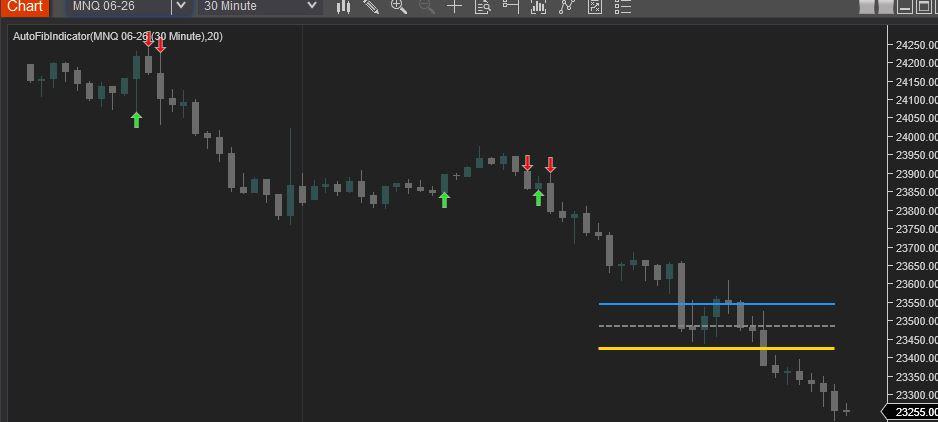
 Find below the Revised AutoFibIndicator Script. Attached is a screen shot showing the compiled script (NT8 version: 8.1.6.3 64-bit). Enjoy! #region Using declarations using System; using System.Collections.Generic; using System.ComponentModel; using System.ComponentModel.DataAnnotations; using System.Linq; using System.Text; using System.Threading.Tasks; using System.Windows; using System.Windows.Input; using System.Windows.Media; using System.Xml.Serialization; using NinjaTrader.Cbi; using NinjaTrader.Gui; using NinjaTrader.Gui.Chart; using NinjaTrader.Data; using NinjaTrader.NinjaScript; using NinjaTrader.Core.FloatingPoint; using NinjaTrader.NinjaScript.DrawingTools; #endregion namespace NinjaTrader.NinjaScript.Indicators { public class AutoFibIndicator : Indicator { private MAX maxIndicator; private MIN minIndicator; [NinjaScriptProperty] [Range(1, int.MaxValue)] [Display(Name="Lookback", Order=1, GroupName="Parameters")] public int Lookback { get; set; } #region Color Properties [XmlIgnore] [Display(Name="Fib 38.2 Color", Order=2, GroupName="Colors")] public Brush Fib382Color { get; set; } [Browsable(false)] public string Fib382ColorSerializable { get { return Serialize.BrushToString(Fib382Color); } set { Fib382Color = Serialize.StringToBrush(value); } } [XmlIgnore] [Display(Name="Fib 50.0 Color", Order=3, GroupName="Colors")] public Brush Fib50Color { get; set; } [Browsable(false)] public string Fib50ColorSerializable { get { return Serialize.BrushToString(Fib50Color); } set { Fib50Color = Serialize.StringToBrush(value); } } [XmlIgnore] [Display(Name="Fib 61.8 Color", Order=4, GroupName="Colors")] public Brush Fib618Color { get; set; } [Browsable(false)] public string Fib618ColorSerializable { get { return Serialize.BrushToString(Fib618Color); } set { Fib618Color = Serialize.StringToBrush(value); } } [XmlIgnore] [Display(Name="Long Signal Color", Order=5, GroupName="Colors")] public Brush LongColor { get; set; } [Browsable(false)] public string LongColorSerializable { get { return Serialize.BrushToString(LongColor); } set { LongColor = Serialize.StringToBrush(value); } } [XmlIgnore] [Display(Name="Short Signal Color", Order=6, GroupName="Colors")] public Brush ShortColor { get; set; } [Browsable(false)] public string ShortColorSerializable { get { return Serialize.BrushToString(ShortColor); } set { ShortColor = Serialize.StringToBrush(value); } } #endregion protected override void OnStateChange() { if (State == State.SetDefaults) { Description = @"Automatically plots Fibonacci levels based on a lookback period."; Name = "AutoFibIndicator"; Calculate = Calculate.OnBarClose; IsOverlay = true; DisplayInDataBox = true; DrawOnPricePanel = true; IsSuspendedWhileInactive = true; Lookback = 20; Fib382Color = Brushes.DodgerBlue; Fib50Color = Brushes.Gray; Fib618Color = Brushes.Gold; LongColor = Brushes.Lime; ShortColor = Brushes.Red; } else if (State == State.DataLoaded) { maxIndicator = MAX(High, Lookback); minIndicator = MIN(Low, Lookback); } } protected override void OnBarUpdate() { if (CurrentBar < Lookback) return; double swingHigh = maxIndicator[0]; double swingLow = minIndicator[0]; double range = swingHigh - swingLow; if (range <= 0) return; double fib382 = swingHigh - (range * 0.382); double fib50 = swingHigh - (range * 0.5); double fib618 = swingHigh - (range * 0.618); // Using static tags for lines ensures they "move" with the lookback rather than creating new ones Draw.Line(this, "Fib382", false, Lookback, fib382, 0, fib382, Fib382Color, DashStyleHelper.Solid, 2); Draw.Line(this, "Fib50", false, Lookback, fib50, 0, fib50, Fib50Color, DashStyleHelper.Dash, 2); Draw.Line(this, "Fib618", false, Lookback, fib618, 0, fib618, Fib618Color, DashStyleHelper.Solid, 3); // Signal Logic // Long: Close crosses above 61.8% if (CrossAbove(Close, fib618, 1)) { Draw.ArrowUp(this, "Long" + CurrentBar, true, 0, Low[0] - (5 * TickSize), LongColor); } // Short: Close crosses below 61.8% if (CrossBelow(Close, fib618, 1)) { Draw.ArrowDown(this, "Short" + CurrentBar, true, 0, High[0] + (5 * TickSize), ShortColor); } } } }
-
i think no one have this one
-
 joshie joined the community
 -
 Handi Santoso joined the community
 -
 Then the ARC-Neurostreet has this auto fib with entry and exit.😇And stoploss, I should add.
 -
I know what you mean; this code should include entry signals, targets and stop-loss levels
-
I recall, DTB has autofib indicator in its package. TDU also has autofib. Just another idea, maybe useful to you.
-
#region Using declarations using System; using System.Windows.Media; using NinjaTrader.NinjaScript; using NinjaTrader.NinjaScript.Indicators; using NinjaTrader.NinjaScript.DrawingTools; using NinjaTrader.Data; using NinjaTrader.Cbi; #endregion namespace NinjaTrader.NinjaScript.Indicators { public class AutoFibIndicator : Indicator { private int lookback = 20; private double swingHigh; private double swingLow; private MAX maxIndicator; private MIN minIndicator; // Farben frei wählbar [NinjaScriptProperty] public Brush Fib382Color { get; set; } [NinjaScriptProperty] public Brush Fib50Color { get; set; } [NinjaScriptProperty] public Brush Fib618Color { get; set; } [NinjaScriptProperty] public Brush LongColor { get; set; } [NinjaScriptProperty] public Brush ShortColor { get; set; } protected override void OnStateChange() { if (State == State.SetDefaults) { Name = "AutoFibIndicator"; Calculate = Calculate.OnBarClose; IsOverlay = true; IsSuspendedWhileInactive = true; Fib382Color = Brushes.DodgerBlue; Fib50Color = Brushes.Gray; Fib618Color = Brushes.Gold; LongColor = Brushes.Lime; ShortColor = Brushes.Red; } else if (State == State.Configure) { // Hier können Konfigurationen vorgenommen werden } else if (State == State.DataLoaded) { // MAX und MIN Indikatoren initialisieren maxIndicator = MAX(High, lookback); minIndicator = MIN(Low, lookback); } } protected override void OnBarUpdate() { if (CurrentBar < lookback) return; if (maxIndicator == null || minIndicator == null) return; // Aktuelle Swing High und Low abrufen swingHigh = maxIndicator[0]; swingLow = minIndicator[0]; double range = swingHigh - swingLow; double fib382 = swingHigh - range * 0.382; double fib50 = swingHigh - range * 0.5; double fib618 = swingHigh - range * 0.618; int startBar = CurrentBar - lookback; // Bestehende Linien löschen, um Überlappungen zu vermeiden string fib382Tag = "Fib382"; string fib50Tag = "Fib50"; string fib618Tag = "Fib618"; RemoveDrawObject(fib382Tag); RemoveDrawObject(fib50Tag); RemoveDrawObject(fib618Tag); // === FIB LINIEN === Draw.Line(this, fib382Tag, false, startBar, fib382, CurrentBar, fib382, Fib382Color, DashStyleHelper.Solid, 2); Draw.Line(this, fib50Tag, false, startBar, fib50, CurrentBar, fib50, Fib50Color, DashStyleHelper.Dash, 2); Draw.Line(this, fib618Tag, false, startBar, fib618, CurrentBar, fib618, Fib618Color, DashStyleHelper.Solid, 3); // === SIGNAL LOGIK === string longTag = "Long" + CurrentBar; string shortTag = "Short" + CurrentBar; // LONG (Bounce über 61.8) if (Close[0] > fib618 && Close[1] <= fib618) { Draw.ArrowUp(this, longTag, false, 0, Low[0] - (2 * TickSize), LongColor); } // SHORT (Reject unter 61.8) if (Close[0] < fib618 && Close[1] >= fib618) { Draw.ArrowDown(this, shortTag, false, 0, High[0] + (2 * TickSize), ShortColor); } } protected override void OnRender(ChartControl chartControl, ChartScale chartScale) { // Optional: Hier kann zusätzliches Rendering durchgeführt werden base.OnRender(chartControl, chartScale); } } }
-
Haha limited edition 😄Every detail counts .. Name is just part of the user experience 😌
-
@Ninja_On_The_Roof @everyone For NQ Scalping through Captain Optimus strong, What may be best settings template for Ninza InfinityAlgo_Engine and Zephyrus or omniscan . Apologies for being pushy but if anyone can share the template. Thanks In Advance.