⤴️-Paid Ad- Check advertising disclaimer here. Add your banner here.🔥
All Activity
- Past hour
-
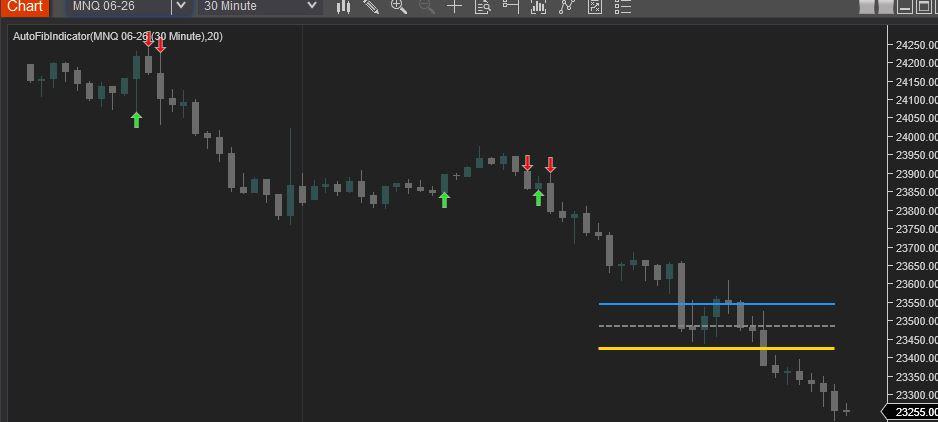
 Find below the Revised AutoFibIndicator Script. Attached is a screen shot showing the compiled script (NT8 version: 8.1.6.3 64-bit). Enjoy! #region Using declarations using System; using System.Collections.Generic; using System.ComponentModel; using System.ComponentModel.DataAnnotations; using System.Linq; using System.Text; using System.Threading.Tasks; using System.Windows; using System.Windows.Input; using System.Windows.Media; using System.Xml.Serialization; using NinjaTrader.Cbi; using NinjaTrader.Gui; using NinjaTrader.Gui.Chart; using NinjaTrader.Data; using NinjaTrader.NinjaScript; using NinjaTrader.Core.FloatingPoint; using NinjaTrader.NinjaScript.DrawingTools; #endregion namespace NinjaTrader.NinjaScript.Indicators { public class AutoFibIndicator : Indicator { private MAX maxIndicator; private MIN minIndicator; [NinjaScriptProperty] [Range(1, int.MaxValue)] [Display(Name="Lookback", Order=1, GroupName="Parameters")] public int Lookback { get; set; } #region Color Properties [XmlIgnore] [Display(Name="Fib 38.2 Color", Order=2, GroupName="Colors")] public Brush Fib382Color { get; set; } [Browsable(false)] public string Fib382ColorSerializable { get { return Serialize.BrushToString(Fib382Color); } set { Fib382Color = Serialize.StringToBrush(value); } } [XmlIgnore] [Display(Name="Fib 50.0 Color", Order=3, GroupName="Colors")] public Brush Fib50Color { get; set; } [Browsable(false)] public string Fib50ColorSerializable { get { return Serialize.BrushToString(Fib50Color); } set { Fib50Color = Serialize.StringToBrush(value); } } [XmlIgnore] [Display(Name="Fib 61.8 Color", Order=4, GroupName="Colors")] public Brush Fib618Color { get; set; } [Browsable(false)] public string Fib618ColorSerializable { get { return Serialize.BrushToString(Fib618Color); } set { Fib618Color = Serialize.StringToBrush(value); } } [XmlIgnore] [Display(Name="Long Signal Color", Order=5, GroupName="Colors")] public Brush LongColor { get; set; } [Browsable(false)] public string LongColorSerializable { get { return Serialize.BrushToString(LongColor); } set { LongColor = Serialize.StringToBrush(value); } } [XmlIgnore] [Display(Name="Short Signal Color", Order=6, GroupName="Colors")] public Brush ShortColor { get; set; } [Browsable(false)] public string ShortColorSerializable { get { return Serialize.BrushToString(ShortColor); } set { ShortColor = Serialize.StringToBrush(value); } } #endregion protected override void OnStateChange() { if (State == State.SetDefaults) { Description = @"Automatically plots Fibonacci levels based on a lookback period."; Name = "AutoFibIndicator"; Calculate = Calculate.OnBarClose; IsOverlay = true; DisplayInDataBox = true; DrawOnPricePanel = true; IsSuspendedWhileInactive = true; Lookback = 20; Fib382Color = Brushes.DodgerBlue; Fib50Color = Brushes.Gray; Fib618Color = Brushes.Gold; LongColor = Brushes.Lime; ShortColor = Brushes.Red; } else if (State == State.DataLoaded) { maxIndicator = MAX(High, Lookback); minIndicator = MIN(Low, Lookback); } } protected override void OnBarUpdate() { if (CurrentBar < Lookback) return; double swingHigh = maxIndicator[0]; double swingLow = minIndicator[0]; double range = swingHigh - swingLow; if (range <= 0) return; double fib382 = swingHigh - (range * 0.382); double fib50 = swingHigh - (range * 0.5); double fib618 = swingHigh - (range * 0.618); // Using static tags for lines ensures they "move" with the lookback rather than creating new ones Draw.Line(this, "Fib382", false, Lookback, fib382, 0, fib382, Fib382Color, DashStyleHelper.Solid, 2); Draw.Line(this, "Fib50", false, Lookback, fib50, 0, fib50, Fib50Color, DashStyleHelper.Dash, 2); Draw.Line(this, "Fib618", false, Lookback, fib618, 0, fib618, Fib618Color, DashStyleHelper.Solid, 3); // Signal Logic // Long: Close crosses above 61.8% if (CrossAbove(Close, fib618, 1)) { Draw.ArrowUp(this, "Long" + CurrentBar, true, 0, Low[0] - (5 * TickSize), LongColor); } // Short: Close crosses below 61.8% if (CrossBelow(Close, fib618, 1)) { Draw.ArrowDown(this, "Short" + CurrentBar, true, 0, High[0] + (5 * TickSize), ShortColor); } } } }
-
i think no one have this one
-
 ⭐ rcarlos1947 reacted to a post in a topic:
House Of Live Trades
⭐ rcarlos1947 reacted to a post in a topic:
House Of Live Trades
-
⭐ rcarlos1947 reacted to a post in a topic:
House Of Live Trades
-
 joshie joined the community
 -
 ⭐ solarin reacted to a post in a topic:
KimSam NT8 GEX Calc
⭐ solarin reacted to a post in a topic:
KimSam NT8 GEX Calc
- Today
-
 Handi Santoso joined the community
 -
 Then the ARC-Neurostreet has this auto fib with entry and exit.😇And stoploss, I should add.
 -
 I know what you mean; this code should include entry signals, targets and stop-loss levels
 -
Harrys reacted to a post in a topic:
KimSam NT8 GEX Calc
-
I recall, DTB has autofib indicator in its package. TDU also has autofib. Just another idea, maybe useful to you.
-
Harrys reacted to a post in a topic:
KimSam NT8 GEX Calc
-
#region Using declarations using System; using System.Windows.Media; using NinjaTrader.NinjaScript; using NinjaTrader.NinjaScript.Indicators; using NinjaTrader.NinjaScript.DrawingTools; using NinjaTrader.Data; using NinjaTrader.Cbi; #endregion namespace NinjaTrader.NinjaScript.Indicators { public class AutoFibIndicator : Indicator { private int lookback = 20; private double swingHigh; private double swingLow; private MAX maxIndicator; private MIN minIndicator; // Farben frei wählbar [NinjaScriptProperty] public Brush Fib382Color { get; set; } [NinjaScriptProperty] public Brush Fib50Color { get; set; } [NinjaScriptProperty] public Brush Fib618Color { get; set; } [NinjaScriptProperty] public Brush LongColor { get; set; } [NinjaScriptProperty] public Brush ShortColor { get; set; } protected override void OnStateChange() { if (State == State.SetDefaults) { Name = "AutoFibIndicator"; Calculate = Calculate.OnBarClose; IsOverlay = true; IsSuspendedWhileInactive = true; Fib382Color = Brushes.DodgerBlue; Fib50Color = Brushes.Gray; Fib618Color = Brushes.Gold; LongColor = Brushes.Lime; ShortColor = Brushes.Red; } else if (State == State.Configure) { // Hier können Konfigurationen vorgenommen werden } else if (State == State.DataLoaded) { // MAX und MIN Indikatoren initialisieren maxIndicator = MAX(High, lookback); minIndicator = MIN(Low, lookback); } } protected override void OnBarUpdate() { if (CurrentBar < lookback) return; if (maxIndicator == null || minIndicator == null) return; // Aktuelle Swing High und Low abrufen swingHigh = maxIndicator[0]; swingLow = minIndicator[0]; double range = swingHigh - swingLow; double fib382 = swingHigh - range * 0.382; double fib50 = swingHigh - range * 0.5; double fib618 = swingHigh - range * 0.618; int startBar = CurrentBar - lookback; // Bestehende Linien löschen, um Überlappungen zu vermeiden string fib382Tag = "Fib382"; string fib50Tag = "Fib50"; string fib618Tag = "Fib618"; RemoveDrawObject(fib382Tag); RemoveDrawObject(fib50Tag); RemoveDrawObject(fib618Tag); // === FIB LINIEN === Draw.Line(this, fib382Tag, false, startBar, fib382, CurrentBar, fib382, Fib382Color, DashStyleHelper.Solid, 2); Draw.Line(this, fib50Tag, false, startBar, fib50, CurrentBar, fib50, Fib50Color, DashStyleHelper.Dash, 2); Draw.Line(this, fib618Tag, false, startBar, fib618, CurrentBar, fib618, Fib618Color, DashStyleHelper.Solid, 3); // === SIGNAL LOGIK === string longTag = "Long" + CurrentBar; string shortTag = "Short" + CurrentBar; // LONG (Bounce über 61.8) if (Close[0] > fib618 && Close[1] <= fib618) { Draw.ArrowUp(this, longTag, false, 0, Low[0] - (2 * TickSize), LongColor); } // SHORT (Reject unter 61.8) if (Close[0] < fib618 && Close[1] >= fib618) { Draw.ArrowDown(this, shortTag, false, 0, High[0] + (2 * TickSize), ShortColor); } } protected override void OnRender(ChartControl chartControl, ChartScale chartScale) { // Optional: Hier kann zusätzliches Rendering durchgeführt werden base.OnRender(chartControl, chartScale); } } }
-
Harrys reacted to a post in a topic:
KimSam NT8 GEX Calc
-
kimsam reacted to a post in a topic:
KimSam NT8 GEX Calc
-
Haha limited edition 😄Every detail counts .. Name is just part of the user experience 😌
-
@Ninja_On_The_Roof @everyone For NQ Scalping through Captain Optimus strong, What may be best settings template for Ninza InfinityAlgo_Engine and Zephyrus or omniscan . Apologies for being pushy but if anyone can share the template. Thanks In Advance.
-
Traderbeauty reacted to a post in a topic:
WiSE Indicator
-
Traderbeauty reacted to a post in a topic:
House Of Live Trades
-
Traderbeauty reacted to a post in a topic:
House Of Live Trades
-
It is so great having an indicator named after you huh Kimsam?🥰
-
@Ninja_On_The_Roof Thank You so Much. Genuine Help. You are ultimate Bro..
-
Over time, your Ninjatrader becomes heavy and filled with junkies day in and day out after using it. I have found this tool to clean up the mess. I think it is very useful. Kinda make your Ninjatrader all fresh and clean again. It also comes with the "auto log-in" function. It is kinda annoying that I would have to punch in my password everytime I log in. Yes, I know. It is for security protection but hey, if you wanna skip this step. Then use it. https://limewire.com/d/datun#k83IR7948G
-
Off note, for more than a thousand dollar a piece, I know many of you were itchy to try out the infamous Ninza InfinityAlgo_Engine and, Captain Optimus Strong. Many of you have figured out the right way to make the Infinity works out perfectly. But here for those who truly want to try it. https://limewire.com/d/iA3oi#LKXmoStkwH Be aware that, you gotta give and take. Meaning, these pieces would kill many of your favorite Ninza indicators right off the bat. I didnt have time to go through each of them but I know, the Zephyrus, The OmniScan and the StormEye would work fine with these two, so far, at least. As always, I recommend that you would first go into your documents/bin/custom and copy all the Resource files for Ninza, ones you currently have running. Copy them, save them somewhere, so that if and when you want to switch back to the way you had before with all other Ninza indicators, then just copy them and paste them back into your custom folder. That way, you dont need to uninstall everything to start fresh. Save you a whole lot time. Who knows, maybe you would find these 2 useful to automate all of your other stuff and worthy of giving up a bunch of your other Ninza indicators. Off note once again, for the Infinity to work, you first need to pull up an indicator with signals that you wanna automate it. Then that would show up in the Infinity's setting.
-
@Ninja_On_The_Roof I second it. Absolutely, Bot can never be alternate of human mind.
-
I think you could automate this one. I dont see any issues automating it with PredatorX or other known software. On a side note, I do actually like this QPilot Pro. It is light, easy on the eyes and most importantly, it produces good signals. I also like the panel, works great combined with posted Maverick Radar and Sky's MTF Panel. The only thing I did was to uncheck the Target and Volume Peak. They are just cluttering and clouding the chart. Since I have my own targets set in mind and with other indicators to guide me with the potential targets, I just dont need to have QPilot's targets and Volume Exhaustion. This, cleans up the chart a little bit. But this is just me. Nothing wrong keeping them if you feel like you actually need them there. Just my humble 5 cents worth.🤩
-
https://limewire.com/d/bMZ6q#bL7BAs7TCa
-
Welcome to Indo-Investasi.com. Please feel free to browse around and get to know the others. If you have any questions please don't hesitate to ask.
-
 NieWiederBerlin joined the community
 -

[Get] Gareth Soloway - Master trader Bundle
⭐ emptyhead replied to ⭐ sherbaaz's topic in Forex Clips & Movies
Anyone able to reupload this please? -
[Get] Gareth Soloway elite keys to unlimited success
⭐ emptyhead replied to ⭐ sherbaaz's topic in Forex Clips & Movies
Can someone reupload this please? - Yesterday
-
Noted that for Fusion, you do not import templates just by copy and paste templates into templates via documents/bin/custom way. Import templates using Fusion its Control Panel. Regardless, it is another piece with fancy and extra noise. Looks great but to me, aint worthy of anything.
-
Adapt! You use bots, you get slaughtered. Bots cant adapt to its environment. Bots enter and exit purely based off on your inputs and that is it. Bots dont care or know if market is sloppy or ranging or volatile or there are external disasters or events.
-
Have you tried FlowMatrix. It has a TapeReader indictor that will give you all the bubbles you want.
-
How it's possible to trade in this state.
-
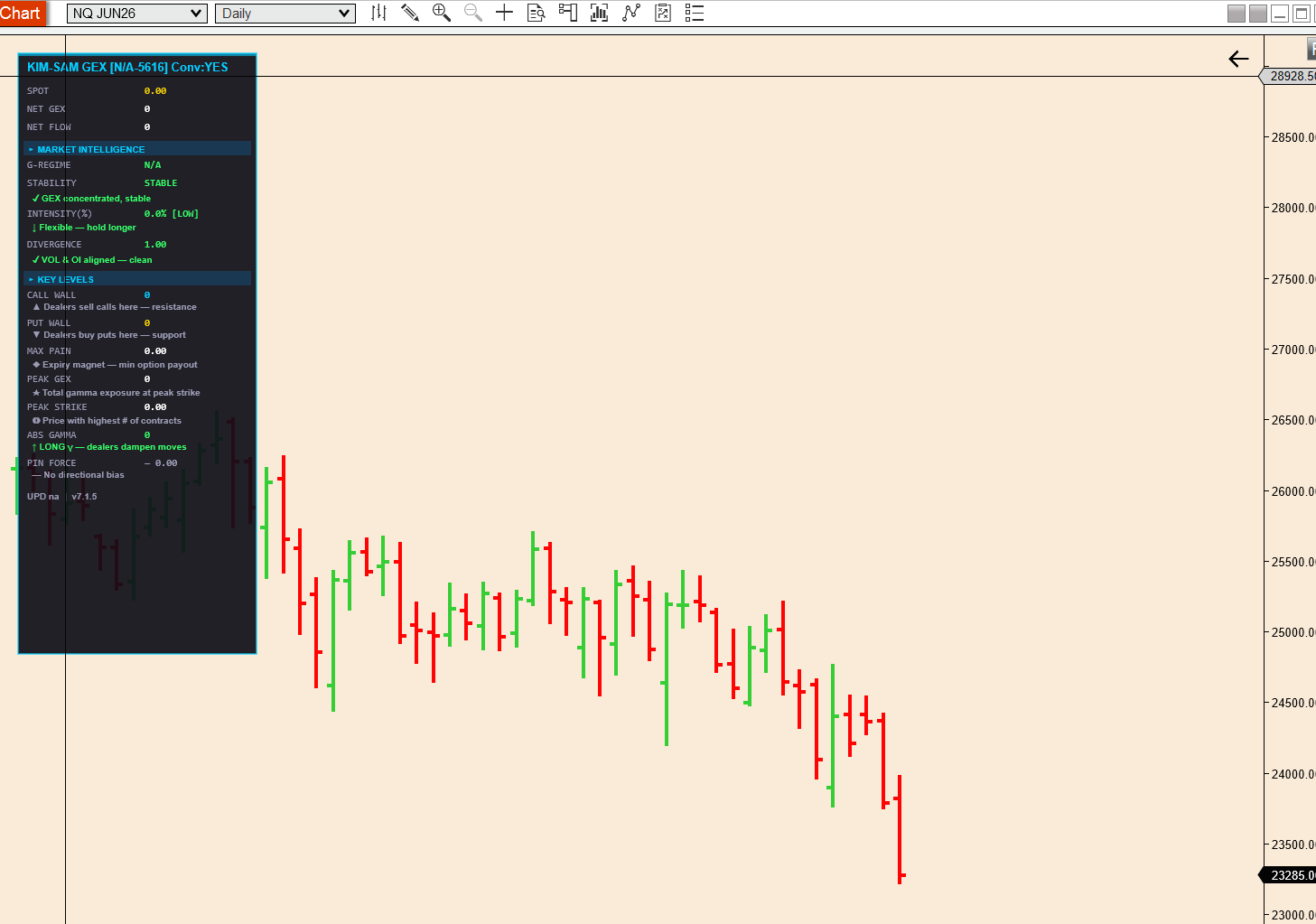
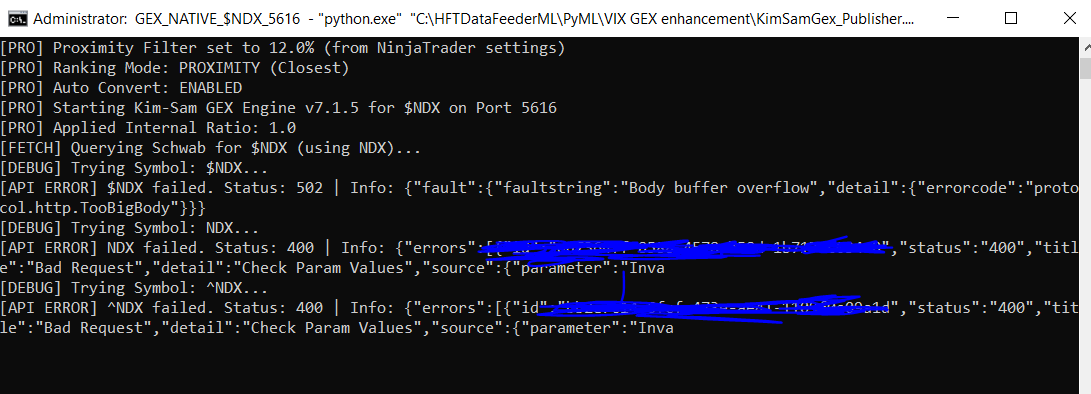
I think one important decision to make is For nq and es futures we have to do autoconvert, the symbols to be used are SPY and QQQ. For any other instrument, we have to use it directly in schawab to see if we get the option chain, if not we have to map to a closet ETF option chain stored in a internal table/array. this is with no autoconvert flag in the NT indicator parameters. Giving price multiplier and offset without autoconvert flag will be misleading. all thee or none imo.
-
nq chart with connect symbok $NDX ; price multiplier is 1 offset is 0.
-
Trader Dale OrderFlow Indicator Request
Ninja_On_The_Roof replied to Narux's topic in Ninja Trader 8
If I recall, this one has been edu and posted long ago, somewhere.